> ## Documentation Index
> Fetch the complete documentation index at: https://docs.tryprofound.com/llms.txt
> Use this file to discover all available pages before exploring further.
# Custom Log Integration
> This documentation explains how to send your application logs directly to Profound's analytics platform using our Custom Log Integration API.
## Overview
The Custom Log Integration allows you to send your application logs directly to Profound's analytics platform using a standardized JSON format. This integration supports batch processing of logs and includes robust validation to ensure data quality while providing detailed feedback on any validation issues.
## Prerequisites
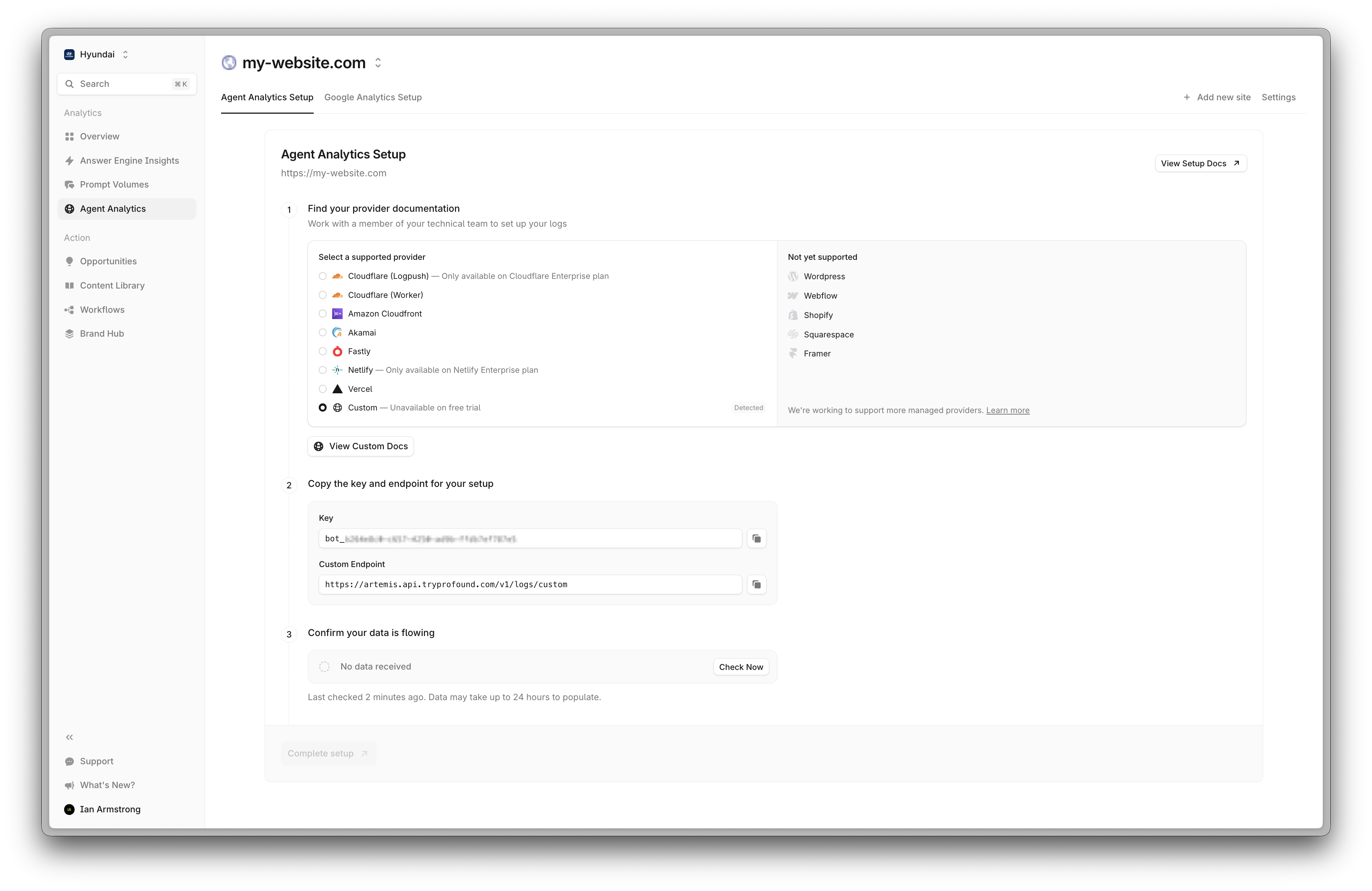
* Your Profound Log Ingestion Token
* The ability to send HTTP POST requests from your application/infrastructure
## API Specification
### Endpoint
```http theme={null}
POST https://artemis.api.tryprofound.com/v1/logs/custom
```
### Authentication
Include your Profound Log Ingestion Token in the request header:
```http theme={null}
'x-api-key': 'bot_PROFOUND_LOG_INGESTION_TOKEN'
```
### Request Format
Logs must be sent as an array of JSON objects. Each log entry requires specific fields:
#### Required Fields
* `timestamp` - Event timestamp (Unix timestamp or ISO 8601 string)
* `method` - HTTP method (max 10 characters)
* `host` - Request hostname (max 255 characters)
* `path` - Request path (max 2048 characters)
* `status_code` - HTTP status code (range: 100-599)
* `ip` - Client IP address (max 45 characters)
* `user_agent` - User agent string (max 1024 characters)
#### Optional Fields
Both `query_params` and `referer` are optional. However, if you do not provide either, human referral data will **not be available** in your dashboard.
* `query_params` - Query parameters (key max: 100 chars, value max: 1000 chars)
* `referer` - Request referer (max 2048 characters)
* `bytes_sent` - Response size in bytes (must be >= 0)
* `duration_ms` - Request duration in milliseconds (must be >= 0)
Each request can contain up to 1,000 log entries. For larger datasets, split your logs into multiple requests.
## Implementation Guide
 Prepare your log data in the required JSON format:
```json theme={null}
[
{
"timestamp": "2024-01-11T12:00:00Z",
"method": "GET",
"host": "example.com",
"path": "/products",
"status_code": 200,
"ip": "192.168.1.1",
"user_agent": "Mozilla/5.0...",
"query_params": {
"category": "electronics",
"page": "1"
},
"referer": "https://example.com",
"bytes_sent": 1024,
"duration_ms": 150
}
]
```
Here's how to send logs using popular programming languages:
Python:
```python theme={null}
import requests
import json
logs = [{
"timestamp": "2024-01-11T12:00:00Z",
"method": "GET",
"host": "example.com",
"path": "/products",
"status_code": 200,
"ip": "192.168.1.1",
"user_agent": "Mozilla/5.0..."
}]
response = requests.post(
"https://artemis.api.tryprofound.com/v1/logs/custom",
headers={
"x-api-key": "bot_PROFOUND_LOG_INGESTION_TOKEN",
"Content-Type": "application/json"
},
json=logs
)
print(response.json())
```
Node.js:
```javascript theme={null}
const axios = require('axios');
const logs = [{
timestamp: "2024-01-11T12:00:00Z",
method: "GET",
host: "example.com",
path: "/products",
status_code: 200,
ip: "192.168.1.1",
user_agent: "Mozilla/5.0..."
}];
axios.post('https://artemis.api.tryprofound.com/v1/logs/custom', logs, {
headers: {
'x-api-key': 'bot_PROFOUND_LOG_INGESTION_TOKEN',
'Content-Type': 'application/json'
}
})
.then(response => console.log(response.data))
.catch(error => console.error(error));
```
Process the API response to confirm successful ingestion or handle any errors:
Successful Response:
```json theme={null}
{
"status": "accepted",
"message": "Processing X log entries",
"first_visit_id": "uuid-string",
"errors": []
}
```
Response with Validation Errors:
```json theme={null}
{
"status": "accepted",
"message": "Processing 98 log entries",
"first_visit_id": "uuid-string",
"errors": [
"Invalid log format: timestamp out of reasonable range",
"Invalid log format: status_code must be between 100 and 599"
]
}
```
## Error Handling
The API handles errors in two ways:
### Validation Errors
For expected validation issues (invalid timestamps, malformed data, etc.), the API will:
* Continue processing valid entries in the batch
* Add validation errors to the `errors` array in the response
* Return a 200 status code with processed entries and errors
### Unexpected Errors
For unexpected errors (server issues, database problems, etc.), the API will:
* Return a 500 status code
* Return an error message in the response detail field
* Not process any entries in the batch
## Best Practices
* Group logs into batches of up to 1,000 entries
* Implement retry logic for failed requests
* Use background processing for log submission
* Send logs asynchronously to avoid impact on application performance
* Consider implementing local buffering
* Use compression for large payloads
## Support
* Contact [support@tryprofound.com](mailto:support@tryprofound.com) for assistance
## Security Considerations
* Store Log Ingestion Tokens securely
* Regularly rotate Log Ingestion Tokens
* Monitor request logs for unusual patterns
* Use HTTPS for all API requests
***
Prepare your log data in the required JSON format:
```json theme={null}
[
{
"timestamp": "2024-01-11T12:00:00Z",
"method": "GET",
"host": "example.com",
"path": "/products",
"status_code": 200,
"ip": "192.168.1.1",
"user_agent": "Mozilla/5.0...",
"query_params": {
"category": "electronics",
"page": "1"
},
"referer": "https://example.com",
"bytes_sent": 1024,
"duration_ms": 150
}
]
```
Here's how to send logs using popular programming languages:
Python:
```python theme={null}
import requests
import json
logs = [{
"timestamp": "2024-01-11T12:00:00Z",
"method": "GET",
"host": "example.com",
"path": "/products",
"status_code": 200,
"ip": "192.168.1.1",
"user_agent": "Mozilla/5.0..."
}]
response = requests.post(
"https://artemis.api.tryprofound.com/v1/logs/custom",
headers={
"x-api-key": "bot_PROFOUND_LOG_INGESTION_TOKEN",
"Content-Type": "application/json"
},
json=logs
)
print(response.json())
```
Node.js:
```javascript theme={null}
const axios = require('axios');
const logs = [{
timestamp: "2024-01-11T12:00:00Z",
method: "GET",
host: "example.com",
path: "/products",
status_code: 200,
ip: "192.168.1.1",
user_agent: "Mozilla/5.0..."
}];
axios.post('https://artemis.api.tryprofound.com/v1/logs/custom', logs, {
headers: {
'x-api-key': 'bot_PROFOUND_LOG_INGESTION_TOKEN',
'Content-Type': 'application/json'
}
})
.then(response => console.log(response.data))
.catch(error => console.error(error));
```
Process the API response to confirm successful ingestion or handle any errors:
Successful Response:
```json theme={null}
{
"status": "accepted",
"message": "Processing X log entries",
"first_visit_id": "uuid-string",
"errors": []
}
```
Response with Validation Errors:
```json theme={null}
{
"status": "accepted",
"message": "Processing 98 log entries",
"first_visit_id": "uuid-string",
"errors": [
"Invalid log format: timestamp out of reasonable range",
"Invalid log format: status_code must be between 100 and 599"
]
}
```
## Error Handling
The API handles errors in two ways:
### Validation Errors
For expected validation issues (invalid timestamps, malformed data, etc.), the API will:
* Continue processing valid entries in the batch
* Add validation errors to the `errors` array in the response
* Return a 200 status code with processed entries and errors
### Unexpected Errors
For unexpected errors (server issues, database problems, etc.), the API will:
* Return a 500 status code
* Return an error message in the response detail field
* Not process any entries in the batch
## Best Practices
* Group logs into batches of up to 1,000 entries
* Implement retry logic for failed requests
* Use background processing for log submission
* Send logs asynchronously to avoid impact on application performance
* Consider implementing local buffering
* Use compression for large payloads
## Support
* Contact [support@tryprofound.com](mailto:support@tryprofound.com) for assistance
## Security Considerations
* Store Log Ingestion Tokens securely
* Regularly rotate Log Ingestion Tokens
* Monitor request logs for unusual patterns
* Use HTTPS for all API requests
***