> ## Documentation Index
> Fetch the complete documentation index at: https://docs.tryprofound.com/llms.txt
> Use this file to discover all available pages before exploring further.
# Shopify
> This documentation details 3 potential Shopify log drain integrations for Profound Agent Analytics platform.
## Overview
Please carefully read the documentation to determine which integration is best for your Shopify site. Not sure which to use? Please contact [support](mailto:support@tryprofound.com) for assistance.
This integration is designed to capture logs from a Shopify site. Shopify is unlike other integrations in that there is no out-of-the-box solution for log exports. We detail three potential integrations for Shopify:
1. Shopify via Nostra (Recommended)
2. Shopify Log Drain via Hydrogen (Requires Hydrogen)
3. Shopify Trace Exporter (Requires Hydrogen)
## Prerequisites
* A Shopify site
* Access and management permissions to the Shopify site
* If connecting via **Nostra**, you must be a customer of both Profound and Nostra.
* If connecting via **Hydrogen**, you must have a Shopify Plus account.
## Configuration
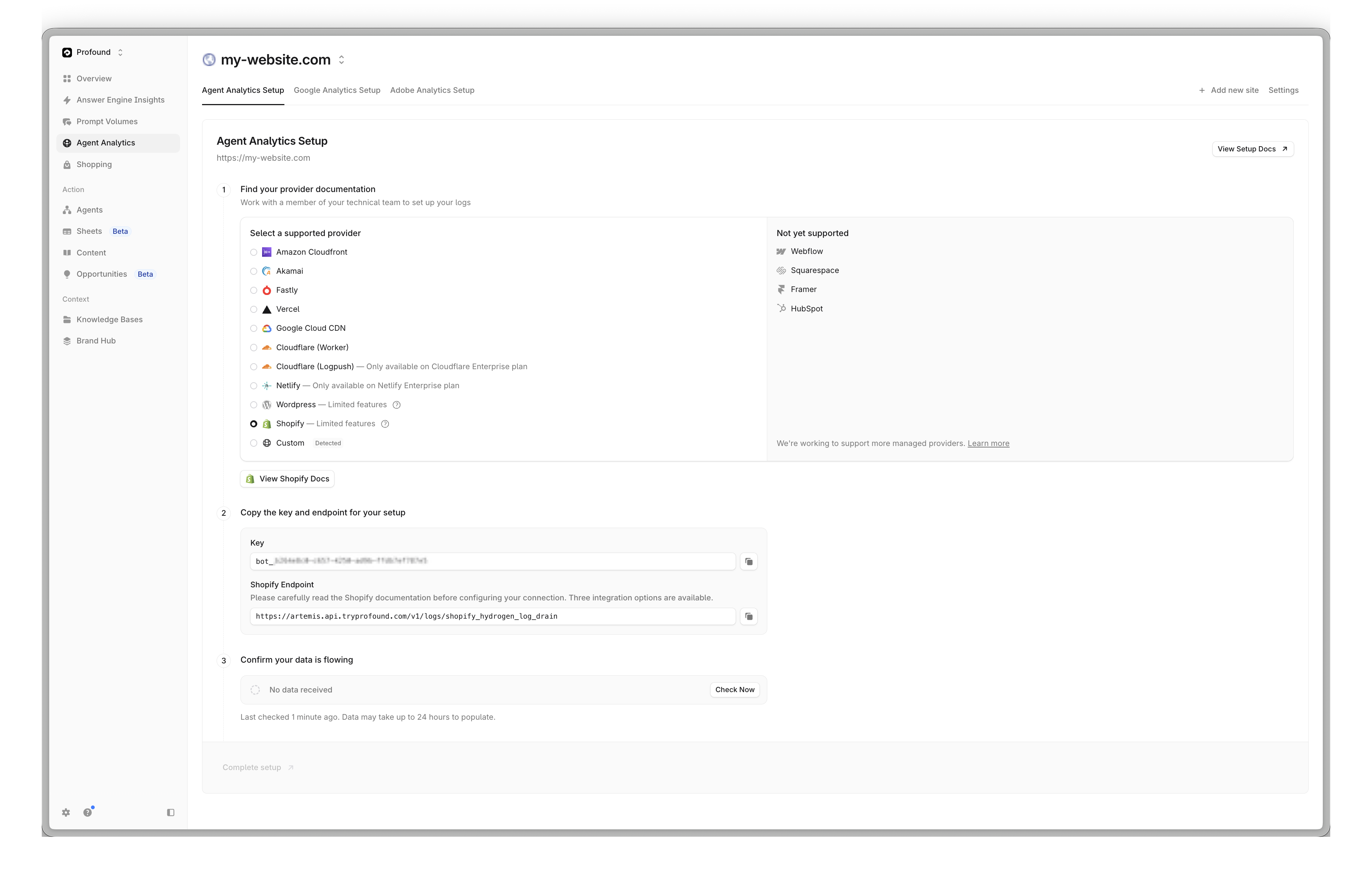 Learn how to integrate your Shopify site with Profound Partner Nostra
Integrating your Shopify site via Nostra is the recommended method with optimal analytics data. This method requires you to use Nostra's platform to track your Shopify site.
Ensure you are a Nostra customer hosting your Shopify site on their platform.
Contact your Nostra account representative to request a log drain integration.
Once the integration is complete, you will be able to see your Shopify site in the Profound dashboard.
That's it! Your Shopify site is now integrated with Profound via Nostra.
Learn how to integrate your Shopify site with Profound via Hydrogen.
This method requires your site uses Hydrogen and you have a Shopify Plus account.
Ensure your Shopify site uses Hydrogen and you have a Shopify Plus account.
Navigate to the Hydrogen Log Drain setup [documentation](https://shopify.dev/docs/storefronts/headless/hydrogen/logging#connecting-a-log-drain) and follow the instructions to configure the log drain.
Select an an `HTTP` log drain for generic integrations. Enter the following URL:
`https://artemis.api.tryprofound.com/v1/logs/shopify_hydrogen`
Provider a header value `Bearer` with your Profound Log Ingestion Token. Your token should start with `bot_PROFOUND_LOG_INGESTION_TOKEN`.
Click **Connect** to connect the log drain.
Learn how to integrate your Shopify site with Profound Partner Nostra
Integrating your Shopify site via Nostra is the recommended method with optimal analytics data. This method requires you to use Nostra's platform to track your Shopify site.
Ensure you are a Nostra customer hosting your Shopify site on their platform.
Contact your Nostra account representative to request a log drain integration.
Once the integration is complete, you will be able to see your Shopify site in the Profound dashboard.
That's it! Your Shopify site is now integrated with Profound via Nostra.
Learn how to integrate your Shopify site with Profound via Hydrogen.
This method requires your site uses Hydrogen and you have a Shopify Plus account.
Ensure your Shopify site uses Hydrogen and you have a Shopify Plus account.
Navigate to the Hydrogen Log Drain setup [documentation](https://shopify.dev/docs/storefronts/headless/hydrogen/logging#connecting-a-log-drain) and follow the instructions to configure the log drain.
Select an an `HTTP` log drain for generic integrations. Enter the following URL:
`https://artemis.api.tryprofound.com/v1/logs/shopify_hydrogen`
Provider a header value `Bearer` with your Profound Log Ingestion Token. Your token should start with `bot_PROFOUND_LOG_INGESTION_TOKEN`.
Click **Connect** to connect the log drain.
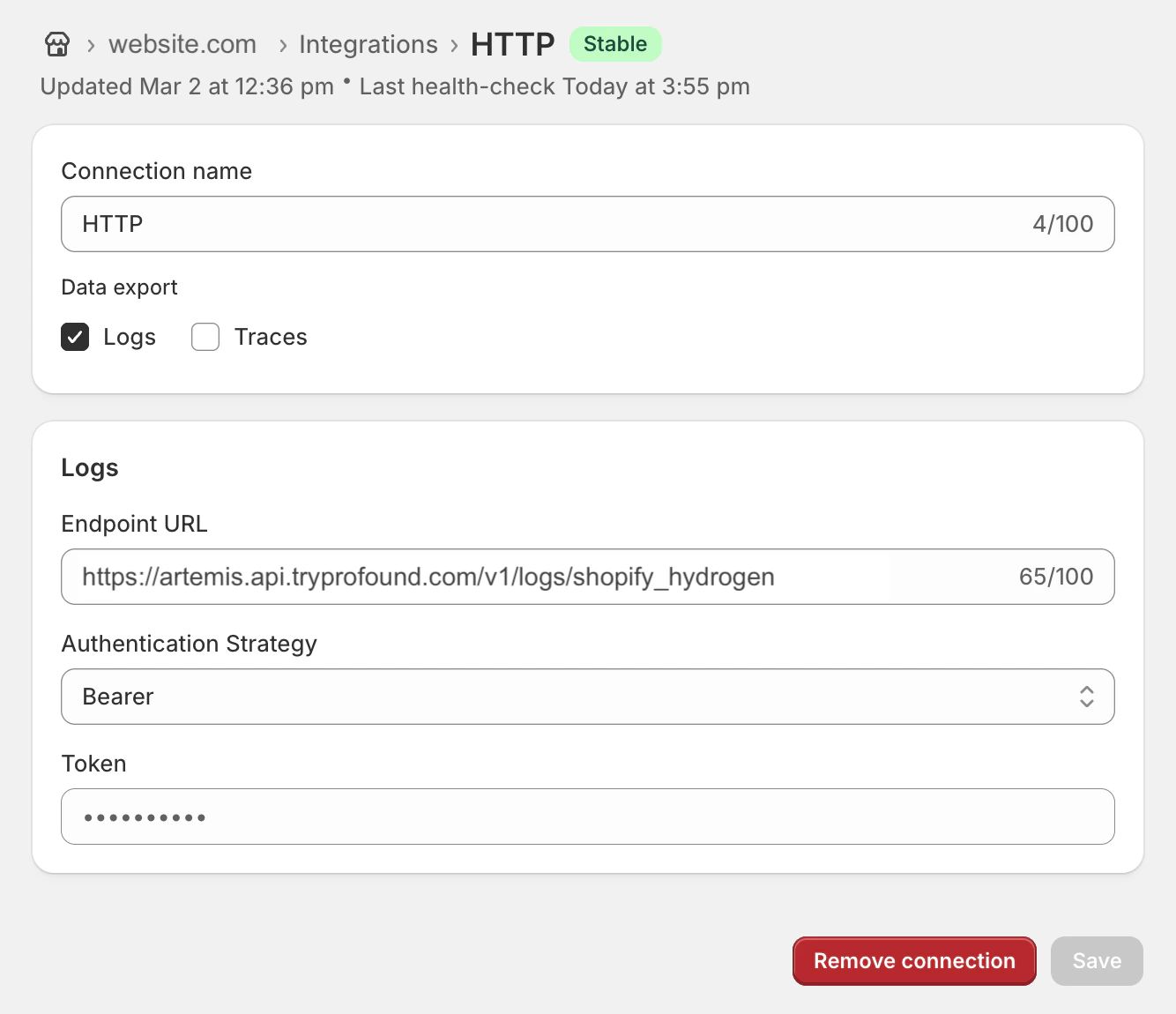 That's it! Your Shopify site is now integrated with Profound via Hydrogen.
Learn how to integrate your Shopify site with Profound via the Trace Exporter.
This method provides sampled tracing data, not a full log export.
This method requires your site uses Hydrogen and you have a Shopify Plus account.
Ensure your Shopify site uses Hydrogen and you have a Shopify Plus account.
Navigate to the Hydrogen Trace Export setup [documentation](https://shopify.dev/docs/storefronts/headless/hydrogen/trace-exports#configure-trace-exports) and follow the instructions to configure trace exports.
Select an `HTTP` trace export for generic integrations. Enter the following URL:
`https://artemis.api.tryprofound.com/v1/logs/shopify_hydrogen`
Provide a header value `x-api-key` with your Profound Log Ingestion Token. Your token should start with `bot_PROFOUND_LOG_INGESTION_TOKEN`.
Click **Save** to save the trace export configuration.
That's it! Your Shopify site is now integrated with Profound via the Trace Exporter.
## Limitations of Hydrogen-Based Integrations
**Important**: Shopify's Hydrogen platform does not expose client IP addresses in log drains or trace exports. This is a platform limitation, not a Profound limitation.
### The Issue
Profound's Agent Analytics uses a multi-step verification process to accurately classify traffic — distinguishing real users from bots, crawlers, and automated agents. A key input to this process is the client IP address.
Shopify's Hydrogen runtime, hosted on Oxygen, strips client IP information from logs and traces before they reach external consumers. Because Profound never receives IP data through these integrations, the multi-step verification process cannot be performed.
This is an unavoidable platform constraint imposed by Shopify. There is no configuration, workaround, or API option to include IP addresses in Hydrogen log drains or trace exports.
### Impact on Analytics
Without client IP addresses, Profound cannot:
* Perform IP-based reputation checks against known bot networks
* Correlate requests across sessions for behavioral analysis
* Apply geographic and network-level classification signals
* Execute the full multi-step verification pipeline
Analytics data from Hydrogen-based integrations will still be collected and displayed, but classification accuracy is reduced compared to integrations that provide complete request metadata.
### Recommendation
We recommend integrating your Shopify site via **Nostra** (option 1 above). Nostra's platform uses a Cloudflare integration under the hood, which provides full request metadata — including client IP addresses. This means the Nostra integration does not suffer from any of the limitations described above, and Profound can run the complete multi-step verification process.
Using the Nostra integration requires you to be a customer of both **Profound** and **Nostra**.
This limitation is not unique to Agent Analytics. Any third-party service consuming Hydrogen log drains or trace exports faces the same constraint — Shopify simply does not include client IP data in these exports. The recommended path for complete traffic visibility on Shopify is through a CDN-native integration like Nostra.
That's it! Your Shopify site is now integrated with Profound via Hydrogen.
Learn how to integrate your Shopify site with Profound via the Trace Exporter.
This method provides sampled tracing data, not a full log export.
This method requires your site uses Hydrogen and you have a Shopify Plus account.
Ensure your Shopify site uses Hydrogen and you have a Shopify Plus account.
Navigate to the Hydrogen Trace Export setup [documentation](https://shopify.dev/docs/storefronts/headless/hydrogen/trace-exports#configure-trace-exports) and follow the instructions to configure trace exports.
Select an `HTTP` trace export for generic integrations. Enter the following URL:
`https://artemis.api.tryprofound.com/v1/logs/shopify_hydrogen`
Provide a header value `x-api-key` with your Profound Log Ingestion Token. Your token should start with `bot_PROFOUND_LOG_INGESTION_TOKEN`.
Click **Save** to save the trace export configuration.
That's it! Your Shopify site is now integrated with Profound via the Trace Exporter.
## Limitations of Hydrogen-Based Integrations
**Important**: Shopify's Hydrogen platform does not expose client IP addresses in log drains or trace exports. This is a platform limitation, not a Profound limitation.
### The Issue
Profound's Agent Analytics uses a multi-step verification process to accurately classify traffic — distinguishing real users from bots, crawlers, and automated agents. A key input to this process is the client IP address.
Shopify's Hydrogen runtime, hosted on Oxygen, strips client IP information from logs and traces before they reach external consumers. Because Profound never receives IP data through these integrations, the multi-step verification process cannot be performed.
This is an unavoidable platform constraint imposed by Shopify. There is no configuration, workaround, or API option to include IP addresses in Hydrogen log drains or trace exports.
### Impact on Analytics
Without client IP addresses, Profound cannot:
* Perform IP-based reputation checks against known bot networks
* Correlate requests across sessions for behavioral analysis
* Apply geographic and network-level classification signals
* Execute the full multi-step verification pipeline
Analytics data from Hydrogen-based integrations will still be collected and displayed, but classification accuracy is reduced compared to integrations that provide complete request metadata.
### Recommendation
We recommend integrating your Shopify site via **Nostra** (option 1 above). Nostra's platform uses a Cloudflare integration under the hood, which provides full request metadata — including client IP addresses. This means the Nostra integration does not suffer from any of the limitations described above, and Profound can run the complete multi-step verification process.
Using the Nostra integration requires you to be a customer of both **Profound** and **Nostra**.
This limitation is not unique to Agent Analytics. Any third-party service consuming Hydrogen log drains or trace exports faces the same constraint — Shopify simply does not include client IP data in these exports. The recommended path for complete traffic visibility on Shopify is through a CDN-native integration like Nostra.