> ## Documentation Index
> Fetch the complete documentation index at: https://docs.tryprofound.com/llms.txt
> Use this file to discover all available pages before exploring further.
# Call API
> Connect an Agent to any external API endpoint
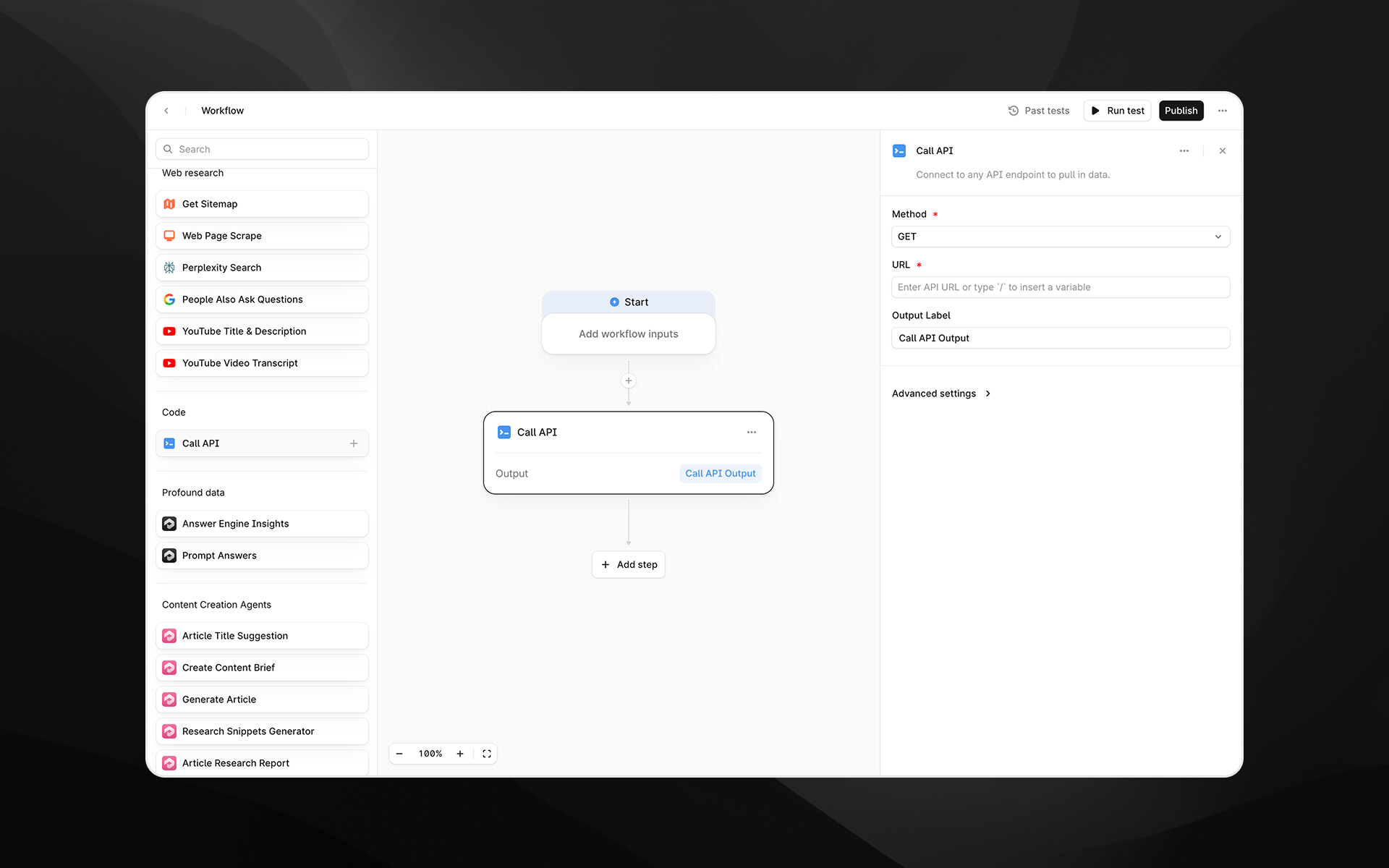
The **Call API** node connects your [Agent](/agents/about) to any external API endpoint. Use this step to retrieve data, trigger external services, enrich Agent inputs, or integrate with your internal systems and tools.
This node supports both **GET** and **POST** requests, optional authentication, and (for POST requests) request bodies in JSON format.
 Check out [Getting started with Agents](/agents/getting-started) to learn how to add this node to an Agent.
## When to use this node
Use Call API for tasks such as:
* Pulling data from third-party tools, CRMs, CMS systems, or analytics platforms
* Triggering external automations or Agents
* Fetching structured data for use in downstream LLM steps
* Enriching Agent execution with custom business logic hosted elsewhere
* Integrating Profound Agents with internal APIs or microservices
## Node configuration
Selecting the Call API node opens its configuration panel on the right side of the Agent builder.
### Method (required)
Choose the HTTP method for the request:
* **GET** – Retrieve data from an API endpoint
* **POST** – Send data to an endpoint; allows including a request body
Choose the method that matches the API you are calling.
### URL (required)
Enter the full API endpoint URL.
You can:
* Paste a static URL
* Dynamically insert variables using `/`, referencing inputs or earlier Agent steps
Examples:
* `https://api.example.com/users/{{user_id}}`
* `https://internal.mycompany.com/search?q={{topic}}`
## Additional configuration for POST requests
If the method is **POST**, additional fields appear.
### Request Body
Enter the JSON payload to send in the request. This is required for POST requests.
Example payload:
```text expandable wrap theme={null}
{
"userId": 1234
"action": "create",
"payload": {
"firstName": "Jack",
"email":"jack@example.com"
}
}
```
Variables can be inserted using `/`.
### Content Type (required for POST)
Choose the content type for the request body:
* **None**
* **Application/Json**
Most APIs expect `application/json`.
## Output Label
Provide a descriptive label for the API response. This becomes the variable name that downstream nodes reference.
Examples:
* `api_response`
* `user_record`
* `external_data`
## Advanced settings
Select **Advanced settings** to configure authentication for the request.
Check out [Getting started with Agents](/agents/getting-started) to learn how to add this node to an Agent.
## When to use this node
Use Call API for tasks such as:
* Pulling data from third-party tools, CRMs, CMS systems, or analytics platforms
* Triggering external automations or Agents
* Fetching structured data for use in downstream LLM steps
* Enriching Agent execution with custom business logic hosted elsewhere
* Integrating Profound Agents with internal APIs or microservices
## Node configuration
Selecting the Call API node opens its configuration panel on the right side of the Agent builder.
### Method (required)
Choose the HTTP method for the request:
* **GET** – Retrieve data from an API endpoint
* **POST** – Send data to an endpoint; allows including a request body
Choose the method that matches the API you are calling.
### URL (required)
Enter the full API endpoint URL.
You can:
* Paste a static URL
* Dynamically insert variables using `/`, referencing inputs or earlier Agent steps
Examples:
* `https://api.example.com/users/{{user_id}}`
* `https://internal.mycompany.com/search?q={{topic}}`
## Additional configuration for POST requests
If the method is **POST**, additional fields appear.
### Request Body
Enter the JSON payload to send in the request. This is required for POST requests.
Example payload:
```text expandable wrap theme={null}
{
"userId": 1234
"action": "create",
"payload": {
"firstName": "Jack",
"email":"jack@example.com"
}
}
```
Variables can be inserted using `/`.
### Content Type (required for POST)
Choose the content type for the request body:
* **None**
* **Application/Json**
Most APIs expect `application/json`.
## Output Label
Provide a descriptive label for the API response. This becomes the variable name that downstream nodes reference.
Examples:
* `api_response`
* `user_record`
* `external_data`
## Advanced settings
Select **Advanced settings** to configure authentication for the request.
Authentication is required for APIs that are not publicly accessible.
### Authentication Type (required)
Choose the authentication mechanism:
* **None** – no authentication
* **Basic** – username and password
* **Bearer** – bearer token
* **API Key** – custom API key header
Each option exposes different required fields.
#### Basic Authentication
Fields:
* Username
* Password
#### Bearer Authentication
Fields:
* Bearer Token
#### API Key Authentication
Fields:
* Header Name
* API Key Value
Example:
* Header Name: `X-API-Key`
* API Key Value: ``
Use the field names expected by the API you are calling.
## Output
The Call API node returns the full response body from the API as text. This output can be passed into:
* LLM steps for parsing, extraction, or summarization
* Logic and transformation nodes
* Downstream API calls
* Any step requiring structured or semi-structured external data
The output may be JSON, HTML, plain text, or any content type returned by the API.
## Example usage
### 1. Fetch user profile data
1. Add a **Call API** node with:
* Method: GET
* URL: `https://api.example.com/users/{{user_id}}`
* Output Label: `user_profile`
2. Pass \{\{user\_profile}} into an LLM step for analysis or transformation.
### 2. Submit Agent data to an external service
1. Add a **Call API** node with:
* Method: POST
* URL: `https://hooks.example.com/events`
* Content Type: Application/Json
```text wrap theme={null}
Request Body:{
"transcript": "{{video_transcript}}",
"summary": "{{summary}}"
}
```
* Output Label: `event_response`
### 3. Use authenticated APIs
1. Under **Advanced settings**, choose the appropriate authentication type.
2. Provide credentials (e.g., Bearer Token or API Key).
3. Use GET or POST as needed to retrieve secure data.
## Best practices
* Always verify the API’s expected method, headers, payload structure, and authentication requirements before configuring the node.
* Use variables to dynamically build URLs or request bodies for more flexible Agents.
* When sending JSON, ensure proper formatting: malformed JSON will cause the request to fail.
* Keep output labels descriptive, especially when chaining multiple API calls.
## Troubleshooting
### The API returns an error
Check:
* URL correctness
* Required query parameters
* Authentication credentials
* JSON body structure (for POST)
### The response is empty or unexpected
APIs may return HTML error pages or wrapper objects. Use a Prompt LLM step to interpret or extract relevant portions.
### Variables aren’t resolving
Insert variables by typing `/` and selecting from the variable picker.