> ## Documentation Index
> Fetch the complete documentation index at: https://docs.tryprofound.com/llms.txt
> Use this file to discover all available pages before exploring further.
# Get Sitemap
> Build a complete sitemap of any publicly accessible website
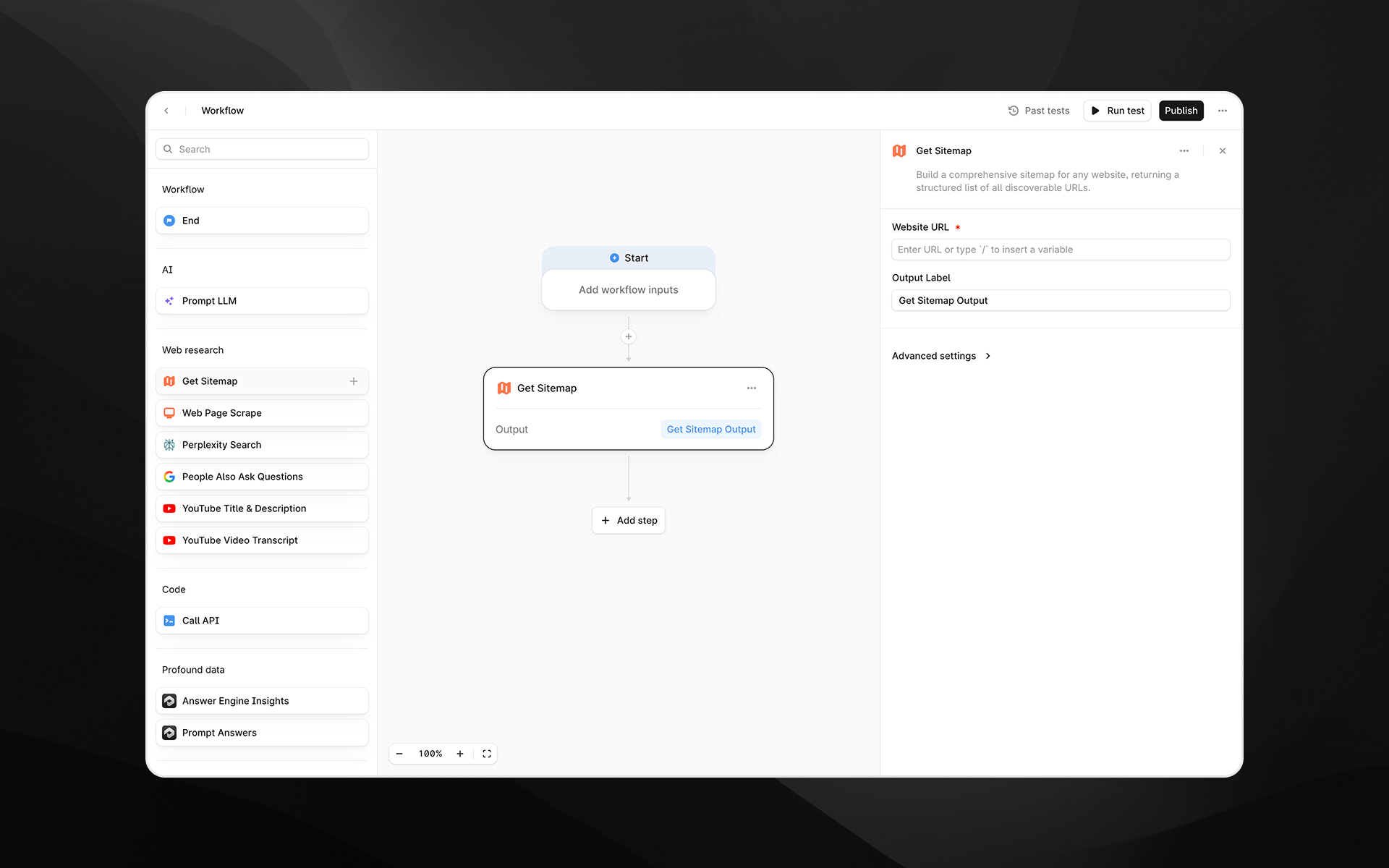
The **Get Sitemap** node builds a comprehensive sitemap for any publicly accessible website. It returns a structured list of all discoverable URLs, giving you a complete view of a site’s content footprint.
This is useful for research, content audits, competitive analysis, content planning, and feeding large sets of URLs into downstream [Agent](/agents/about) steps.
Behind the scenes, this node uses Firecrawl’s sitemap and site-mapping capabilities to crawl a domain and return a clean, deduplicated list of URLs, but the process is fully abstracted for you inside Profound.
 Check out [Getting started with Agents](/agents/getting-started) to learn how to add this node to an Agent.
## When to use this node
Use **Get Sitemap** when you want to:
* Audit all URLs on your own site or a competitor’s
* Identify content gaps or opportunities for AEO
* Build Agents that automatically analyze or summarize entire sites
* Retrieve source URLs for bulk scraping, bulk insights, or large-scale content research
* Feed multiple URLs into LLM steps for comparison, clustering, or extraction
* Conduct technical/SEO reviews or map site hierarchy
This is a foundational node for building AEO-aware research pipelines.
## Node configuration
### Website URL (required)
Enter the base URL of the website you want to map.
Examples:
* `https://example.com`
* `https://www.competitor-site.com`
* `https://docs.example.com`
The node will crawl the domain starting from this URL and attempt to discover all reachable pages.
You can type the URL directly or use `/` to insert variables from earlier Agent steps.
### Output Label
Provide a name for the node's result, such as:
* `sitemap`
* `site_urls`
* `mapped_pages`
This label will reference the sitemap output in later steps.
## Advanced settings
Expand **Advanced settings** to configure crawl depth and filtering.
### Search Query
Allows you to filter the sitemap results by keyword.
Examples:
* `blog`
* `pricing`
* `case-study`
* `ai`
This is helpful when you only want URLs matching a specific topic or section of the site.
### Maximum Results
Limits the number of URLs returned.
Check out [Getting started with Agents](/agents/getting-started) to learn how to add this node to an Agent.
## When to use this node
Use **Get Sitemap** when you want to:
* Audit all URLs on your own site or a competitor’s
* Identify content gaps or opportunities for AEO
* Build Agents that automatically analyze or summarize entire sites
* Retrieve source URLs for bulk scraping, bulk insights, or large-scale content research
* Feed multiple URLs into LLM steps for comparison, clustering, or extraction
* Conduct technical/SEO reviews or map site hierarchy
This is a foundational node for building AEO-aware research pipelines.
## Node configuration
### Website URL (required)
Enter the base URL of the website you want to map.
Examples:
* `https://example.com`
* `https://www.competitor-site.com`
* `https://docs.example.com`
The node will crawl the domain starting from this URL and attempt to discover all reachable pages.
You can type the URL directly or use `/` to insert variables from earlier Agent steps.
### Output Label
Provide a name for the node's result, such as:
* `sitemap`
* `site_urls`
* `mapped_pages`
This label will reference the sitemap output in later steps.
## Advanced settings
Expand **Advanced settings** to configure crawl depth and filtering.
### Search Query
Allows you to filter the sitemap results by keyword.
Examples:
* `blog`
* `pricing`
* `case-study`
* `ai`
This is helpful when you only want URLs matching a specific topic or section of the site.
### Maximum Results
Limits the number of URLs returned.
Default: **100**
Set this higher or lower depending on your use case:
* **100–500** for competitive research
* **500–2,000** for large content audits
* **10–50** for quick sampling or lightweight Agents
## Output
The node returns a structured list of URLs in a clean, machine-readable format.
Each entry typically includes:
* The page URL
* Basic metadata discovered during crawling
* Normalized and deduplicated links
This output can be consumed directly by:
* [Web Page Scrape](/agents/nodes/web-page-scrape)
* [Perplexity Search](/agents/nodes/perplexity-search)
* [Prompt LLM](/agents/nodes/prompt-llm)
* [Profound data nodes](/agents/nodes/data/visibility-score)
* Custom analysis or extraction steps
## Example usage
### 1. Build a full competitor content audit
1. Add **Get Sitemap** with `https://competitor.com`
2. Feed output into [Web Page Scrape](/agents/nodes/web-page-scrape) using an loop or batched Agent
3. Analyze patterns using [Prompt LLM](/agents/nodes/prompt-llm) (e.g., topics, structure, gaps)
4. Generate a research report or summary
### 2. Identify content gaps for AEO
1. Use **Get Sitemap** to list all pages on your site
2. Use [Citation Pages](/agents/nodes/data/citation-pages) to see which pages are cited
3. Use [Prompt LLM](/agents/nodes/prompt-llm) to identify pages **not** appearing in answer engines
4. Generate recommendations or content improvements
### 3. Large-scale content generation
1. Retrieve a site’s URLs
2. Filter using the Search Query field (e.g., `/blog`)
3. Feed selected URLs into a [Create Content Brief](/agents/nodes/content-creation/create-content-brief) or [Generate Article](/agents/nodes/content-creation/generate-article) chain
4. Produce updated or derivative content at scale
## Best practices
* Start with a reasonable limit (e.g., 200 URLs) before scaling up, especially for large sites.
* Use **Search Query** to narrow results when you only need a subset of the content.
* Combine with [Prompt LLM](/agents/nodes/prompt-llm) to cluster or categorize URLs.
* For large enterprise websites, run multiple Get Sitemap nodes with different starting URLs (e.g., `/blog`, `/products`, `/docs`).
* Use descriptive output labels when chaining multiple sitemap operations.