> ## Documentation Index
> Fetch the complete documentation index at: https://docs.tryprofound.com/llms.txt
> Use this file to discover all available pages before exploring further.
# Perplexity Search
> Run a Perplexity-powered web search and return a citation-backed answer
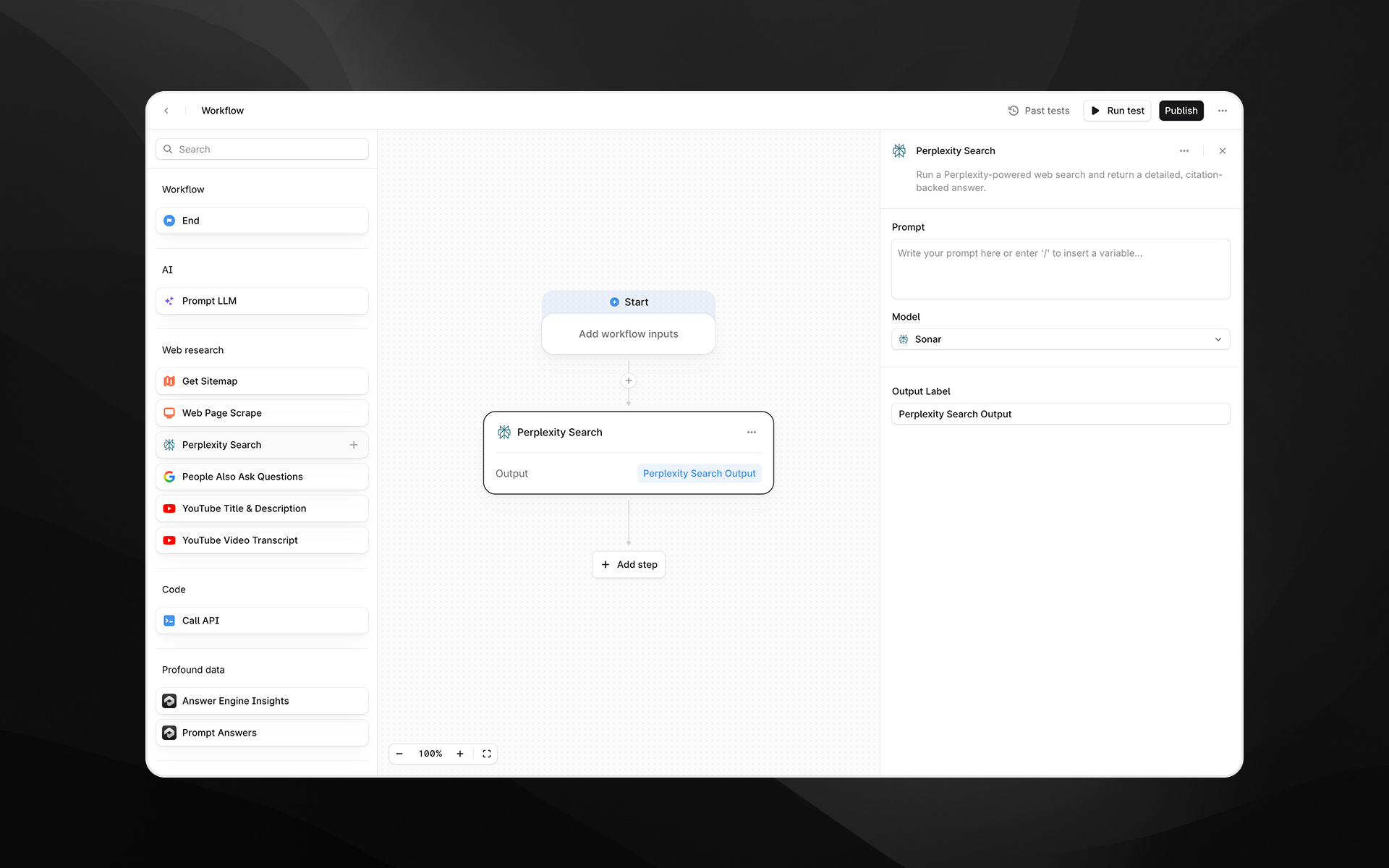
The **Perplexity Search** node runs a Perplexity-powered web search and returns a detailed, citation-backed answer. Use this step when you need synthesized research, verified facts, or aggregated insights from multiple reputable sources.
This node is useful for [Agents](/agents/about) that require high-quality search results before passing the information into LLM steps, analyses, or downstream transformations.
 Check out [Getting started with Agents](/agents/getting-started) to learn how to add this node to an Agent.
## When to use this node
Use Perplexity Search for tasks such as:
* Gathering up-to-date information about a topic, product, company, or trend
* Performing competitive analysis or market research
* Extracting factual answers supported by citations
* Enriching Agents that rely on current web data prior to LLM processing
## Node configuration
Selecting the Perplexity Search node opens its configuration panel on the right side of the Agent Builder.
### Model
Choose the Perplexity model used to process the query. Available options may differ in speed, reasoning depth, and output quality:
* **Sonar**
* **Sonar Pro**
* **Sonar Reasoning**
* **Sonar Reasoning Pro**
* **Sonar Deep Research**
Select a model appropriate for the complexity and depth of the research needed.
### Prompt
Enter the query or instruction you want Perplexity to research.
Check out [Getting started with Agents](/agents/getting-started) to learn how to add this node to an Agent.
## When to use this node
Use Perplexity Search for tasks such as:
* Gathering up-to-date information about a topic, product, company, or trend
* Performing competitive analysis or market research
* Extracting factual answers supported by citations
* Enriching Agents that rely on current web data prior to LLM processing
## Node configuration
Selecting the Perplexity Search node opens its configuration panel on the right side of the Agent Builder.
### Model
Choose the Perplexity model used to process the query. Available options may differ in speed, reasoning depth, and output quality:
* **Sonar**
* **Sonar Pro**
* **Sonar Reasoning**
* **Sonar Reasoning Pro**
* **Sonar Deep Research**
Select a model appropriate for the complexity and depth of the research needed.
### Prompt
Enter the query or instruction you want Perplexity to research.
You can type text directly or insert variables from earlier Agent steps by typing /.
Examples:
* “What are the latest pricing updates for HubSpot Enterprise?”
* “Summarize the top three competitors to \{\{brand\_name}} and provide source links.”
###
### Output Label
Assign a descriptive label to this step’s output. The label becomes the variable name available to later nodes.
Examples:
* `perplexity_answer`
* `research_summary`
* `competitive_insights`
## Output
This node returns a single structured text output containing Perplexity’s synthesized answer, including citations to the underlying sources. The output can be passed directly into steps such as:
* Prompt LLM
* Answer comparison or scoring Agents
* Additional research steps
* API calls or data extraction logic
## Example usage
### 1. Run a research query and summarize with LLM
1. Add a **Perplexity Search** step with a prompt such as:
“Explain the latest changes to Google’s AI Overviews and cite sources.”
2. Add a [Prompt LLM](/agents/nodes/prompt-llm) step:
```text wrap theme={null}
Summarize the following research into 5 bullet points and highlight any implications for SEO:
{{perplexity_search.output}}
```
### 2. Dynamically research competitor information
1. Pass a brand name into the Agent as an input.
2. Use Perplexity Search:
“Provide a competitor overview for \{\{brand\_name}} with citations.”
3. Use the output to generate analysis or comparisons downstream.
## Best practices
* Provide clear, specific prompts to get more accurate citations and structured outputs.
* Use more advanced models (e.g., **Sonar Reasoning Pro** or **Sonar Deep Research**) for complex or multi-step research queries.
* Combine Perplexity Search with Prompt LLM steps to refine, structure, or format the research for your use case.
## Troubleshooting
### Output lacks depth or detail
Try switching to a higher-tier model such as Sonar Pro or Sonar Deep Research.
### Variables are not recognized in the prompt
Type `/` in the prompt field to insert supported Agent variables.
### Returned information seems outdated
Reframe the query to explicitly request the most recent updates or year-specific results.