> ## Documentation Index
> Fetch the complete documentation index at: https://docs.tryprofound.com/llms.txt
> Use this file to discover all available pages before exploring further.
# YouTube Video Transcript
> Extract the full transcript from a public YouTube video
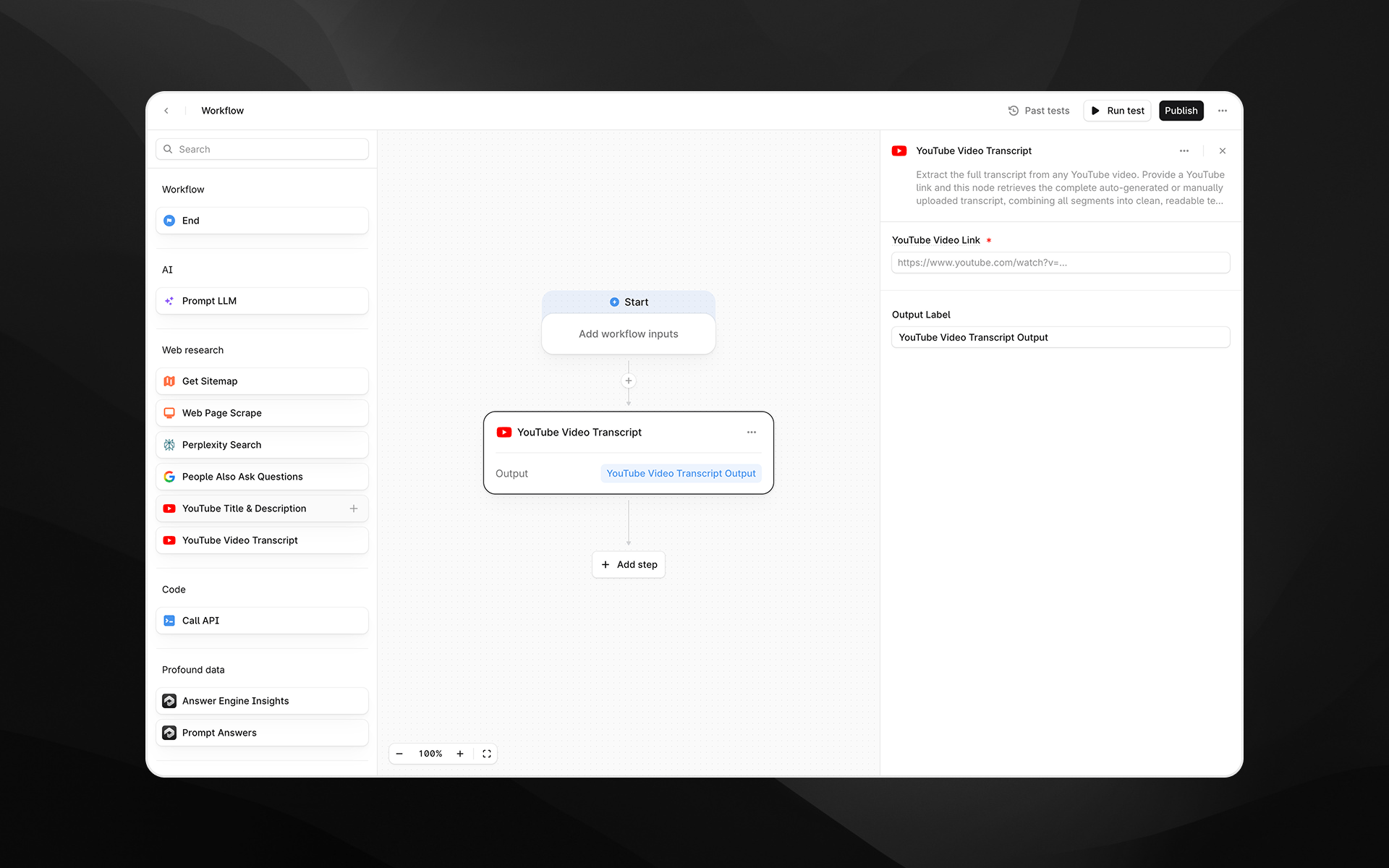
The **YouTube Video Transcript** node extracts the full transcript from any publicly accessible YouTube video. This includes auto-generated or manually uploaded transcripts. The node combines all transcript segments into a clean, readable text output that can be used for analysis, summarization, content extraction, or downstream LLM processing in your [Agents](/agents/about).
 Check out [Getting started with Agents](/agents/getting-started) to learn how to add this node to an Agent.
## When to use this node
Use YouTube Video Transcript for tasks such as:
* Analyzing spoken content from competitor or industry videos
* Creating summaries, highlights, or structured notes using an LLM
* Extracting keywords, entities, or insights from long-form video content
* Feeding transcript text into research, comparison, or content generation Agents
## Node configuration
Selecting the YouTube Video Transcript node opens its configuration panel on the right side of the Agent Builder.
### YouTube Video Link (required)
Enter the URL of the YouTube video whose transcript you want to retrieve.
You can:
* Paste a direct YouTube watch URL
* Insert a dynamic variable from a previous Agent step by typing `/`
Supported formats include typical YouTube links:
Check out [Getting started with Agents](/agents/getting-started) to learn how to add this node to an Agent.
## When to use this node
Use YouTube Video Transcript for tasks such as:
* Analyzing spoken content from competitor or industry videos
* Creating summaries, highlights, or structured notes using an LLM
* Extracting keywords, entities, or insights from long-form video content
* Feeding transcript text into research, comparison, or content generation Agents
## Node configuration
Selecting the YouTube Video Transcript node opens its configuration panel on the right side of the Agent Builder.
### YouTube Video Link (required)
Enter the URL of the YouTube video whose transcript you want to retrieve.
You can:
* Paste a direct YouTube watch URL
* Insert a dynamic variable from a previous Agent step by typing `/`
Supported formats include typical YouTube links:
`https://www.youtube.com/watch?v=VIDEO_ID`
### Output Label
Assign a descriptive label to the transcript output. This becomes the variable name used in downstream nodes.
Examples:
* `video_transcript`
* `yt_transcript`
* `transcript_text`
## Output
This node returns a single text output containing the full transcript of the video. Profound automatically:
* Retrieves all transcript segments
* Orders them correctly
* Merges them into a continuous, readable text block
The result is ideal for use in:
* Prompt LLM analysis
* Summaries and content transformation
* Topic extraction or semantic clustering
* QA extraction or answer engine testing Agents
## Example usage
### 1. Summarize a long YouTube video
1. Add a **YouTube Video Transcript** step with the link to the video.
2. Pass the transcript to a [Prompt LLM](/agents/nodes/prompt-llm) step:
```text wrap theme={null}
Summarize the following transcript into concise bullet points:
{{video_transcript.output}}
```
### 2. Extract insights for competitive analysis
1. Use YouTube Video Transcript to capture the full content of a competitor’s product demo.
2. Pass the output into a [Prompt LLM](/agents/nodes/prompt-llm) step to identify messaging themes, product claims, or feature positioning.
### 3. Generate social content from video text
1. Retrieve the transcript.
2. Use a [Prompt LLM](/agents/nodes/prompt-llm) step to generate snippets or social posts:
```text wrap theme={null}
Create three LinkedIn post variations using insights from this transcript:
{{yt_transcript.output}}
```
## Best practices
* Ensure the video is public or unlisted; transcripts cannot be retrieved from private or restricted videos.
* Auto-generated transcripts may include inaccuracies; consider post-processing with an LLM to improve clarity.
* Use clear output labels, especially when extracting multiple transcripts in a single Agent.
## Troubleshooting
### No transcript is returned
This may occur if the video has no transcript available or is private. Try another video link or verify settings on the source video.
### Transcript content looks fragmented
Profound merges segments automatically, but heavily timestamped or irregular transcripts may benefit from cleanup via a Prompt LLM step.
### Variable insertion is not working
Use `/` inside the URL field to insert available Agent variables.