> ## Documentation Index
> Fetch the complete documentation index at: https://docs.tryprofound.com/llms.txt
> Use this file to discover all available pages before exploring further.
# Call API node
> Connect a Workflow to any external API endpoint
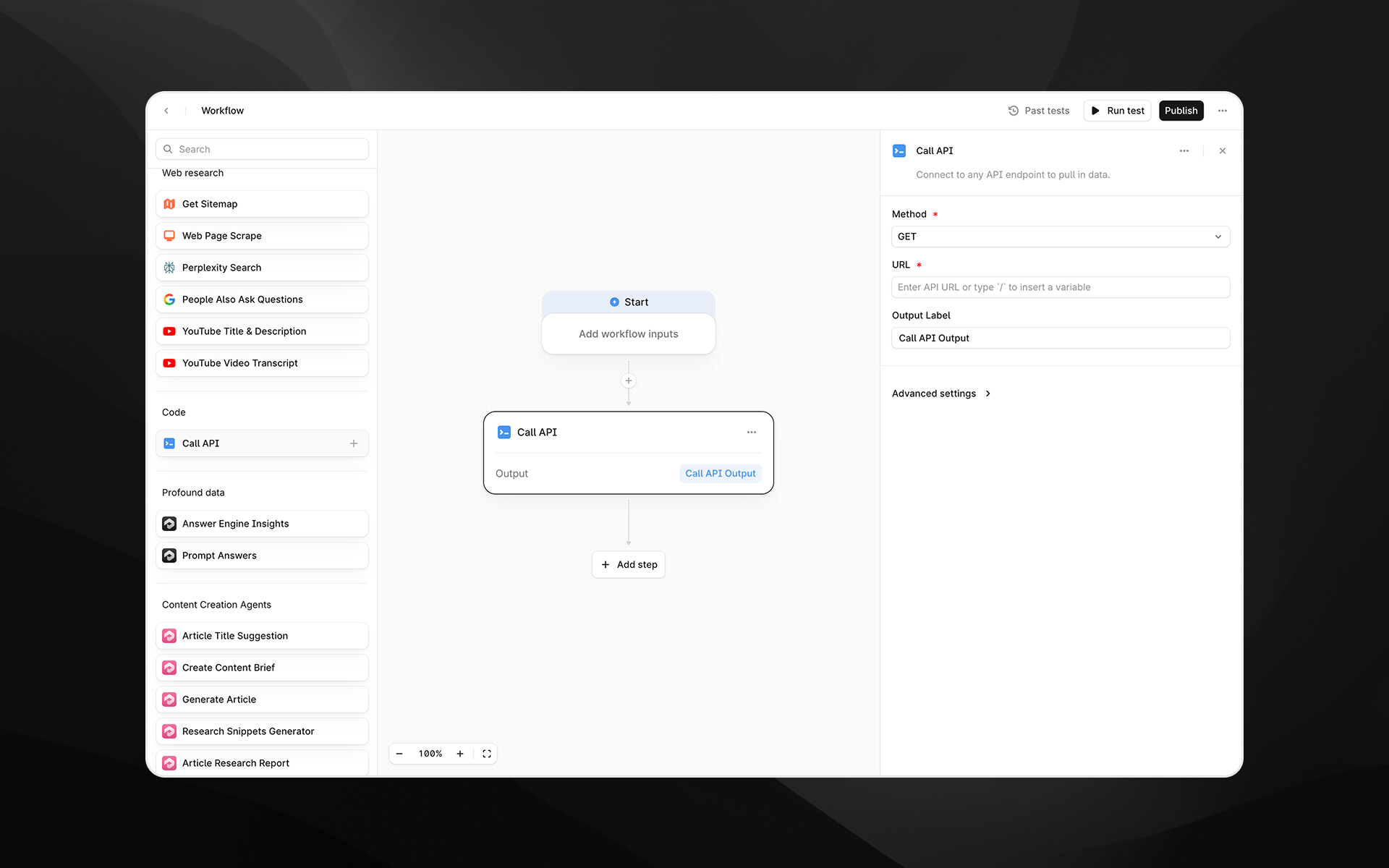
The **Call API** node connects your Workflow to any external API endpoint. Use this step to retrieve data, trigger external services, enrich Workflow inputs, or integrate with your internal systems and tools.
This node supports both **GET** and **POST** requests, optional authentication, and (for POST requests) request bodies in JSON format.
 ## When to use this node
Use Call API for tasks such as:
* Pulling data from third-party tools, CRMs, CMS systems, or analytics platforms
* Triggering external automations or Workflows
* Fetching structured data for use in downstream LLM steps
* Enriching Workflow execution with custom business logic hosted elsewhere
* Integrating Profound Workflows with internal APIs or microservices
## Node configuration
Selecting the Call API node opens its configuration panel on the right side of the Workflow Builder.
### Method (required)
Choose the HTTP method for the request:
* **GET** – Retrieve data from an API endpoint
* **POST** – Send data to an endpoint; allows including a request body
Choose the method that matches the API you are calling.
### URL (required)
Enter the full API endpoint URL.
You can:
* Paste a static URL
* Dynamically insert variables using `/`, referencing inputs or earlier Workflow steps
Examples:
* `https://api.example.com/users/{{user_id}}`
* `https://internal.mycompany.com/search?q={{topic}}`
## Additional configuration for POST requests
If the method is **POST**, additional fields appear.
### Request Body
Enter the JSON payload to send in the request. This is required for POST requests.
Example payload:
```text expandable wrap theme={null}
{
"userId": 1234
"action": "create",
"payload": {
"firstName": "Jack",
"email":"jack@example.com"
}
}
```
Variables can be inserted using `/`.
### Content Type (required for POST)
Choose the content type for the request body:
* **None**
* **Application/Json**
Most APIs expect `application/json`.
## Output Label
Provide a descriptive label for the API response. This becomes the variable name that downstream nodes reference.
Examples:
* `api_response`
* `user_record`
* `external_data`
## Advanced settings
Select **Advanced settings** to configure authentication for the request.
## When to use this node
Use Call API for tasks such as:
* Pulling data from third-party tools, CRMs, CMS systems, or analytics platforms
* Triggering external automations or Workflows
* Fetching structured data for use in downstream LLM steps
* Enriching Workflow execution with custom business logic hosted elsewhere
* Integrating Profound Workflows with internal APIs or microservices
## Node configuration
Selecting the Call API node opens its configuration panel on the right side of the Workflow Builder.
### Method (required)
Choose the HTTP method for the request:
* **GET** – Retrieve data from an API endpoint
* **POST** – Send data to an endpoint; allows including a request body
Choose the method that matches the API you are calling.
### URL (required)
Enter the full API endpoint URL.
You can:
* Paste a static URL
* Dynamically insert variables using `/`, referencing inputs or earlier Workflow steps
Examples:
* `https://api.example.com/users/{{user_id}}`
* `https://internal.mycompany.com/search?q={{topic}}`
## Additional configuration for POST requests
If the method is **POST**, additional fields appear.
### Request Body
Enter the JSON payload to send in the request. This is required for POST requests.
Example payload:
```text expandable wrap theme={null}
{
"userId": 1234
"action": "create",
"payload": {
"firstName": "Jack",
"email":"jack@example.com"
}
}
```
Variables can be inserted using `/`.
### Content Type (required for POST)
Choose the content type for the request body:
* **None**
* **Application/Json**
Most APIs expect `application/json`.
## Output Label
Provide a descriptive label for the API response. This becomes the variable name that downstream nodes reference.
Examples:
* `api_response`
* `user_record`
* `external_data`
## Advanced settings
Select **Advanced settings** to configure authentication for the request.
Authentication is required for APIs that are not publicly accessible.
### Authentication Type (required)
Choose the authentication mechanism:
* **None** – no authentication
* **Basic** – username and password
* **Bearer** – bearer token
* **API Key** – custom API key header
Each option exposes different required fields.
#### Basic Authentication
Fields:
* Username
* Password
#### Bearer Authentication
Fields:
* Bearer Token
#### API Key Authentication
Fields:
* Header Name
* API Key Value
Example:
* Header Name: `X-API-Key`
* API Key Value: ``
Use the field names expected by the API you are calling.
## Output
The Call API node returns the full response body from the API as text. This output can be passed into:
* LLM steps for parsing, extraction, or summarization
* Logic and transformation nodes
* Downstream API calls
* Any step requiring structured or semi-structured external data
The output may be JSON, HTML, plain text, or any content type returned by the API.
## Example usage
### 1. Fetch user profile data
1. Add a **Call API** node with:
* Method: GET
* URL: `https://api.example.com/users/{{user_id}}`
* Output Label: `user_profile`
2. Pass \{\{user\_profile}} into an LLM step for analysis or transformation.
### 2. Submit Workflow data to an external service
1. Add a **Call API** node with:
* Method: POST
* URL: `https://hooks.example.com/events`
* Content Type: Application/Json
```text wrap theme={null}
Request Body:{
"transcript": "{{video_transcript}}",
"summary": "{{summary}}"
}
```
* Output Label: `event_response`
### 3. Use authenticated APIs
1. Under **Advanced settings**, choose the appropriate authentication type.
2. Provide credentials (e.g., Bearer Token or API Key).
3. Use GET or POST as needed to retrieve secure data.
## Best practices
* Always verify the API’s expected method, headers, payload structure, and authentication requirements before configuring the node.
* Use variables to dynamically build URLs or request bodies for more flexible Workflows.
* When sending JSON, ensure proper formatting: malformed JSON will cause the request to fail.
* Keep output labels descriptive, especially when chaining multiple API calls.
## Troubleshooting
### The API returns an error
Check:
* URL correctness
* Required query parameters
* Authentication credentials
* JSON body structure (for POST)
### The response is empty or unexpected
APIs may return HTML error pages or wrapper objects. Use a Prompt LLM step to interpret or extract relevant portions.
### Variables aren’t resolving
Insert variables by typing `/` and selecting from the variable picker.