> ## Documentation Index
> Fetch the complete documentation index at: https://docs.tryprofound.com/llms.txt
> Use this file to discover all available pages before exploring further.
# Get Sitemap node
> Build a complete sitemap of any publicly accessible website
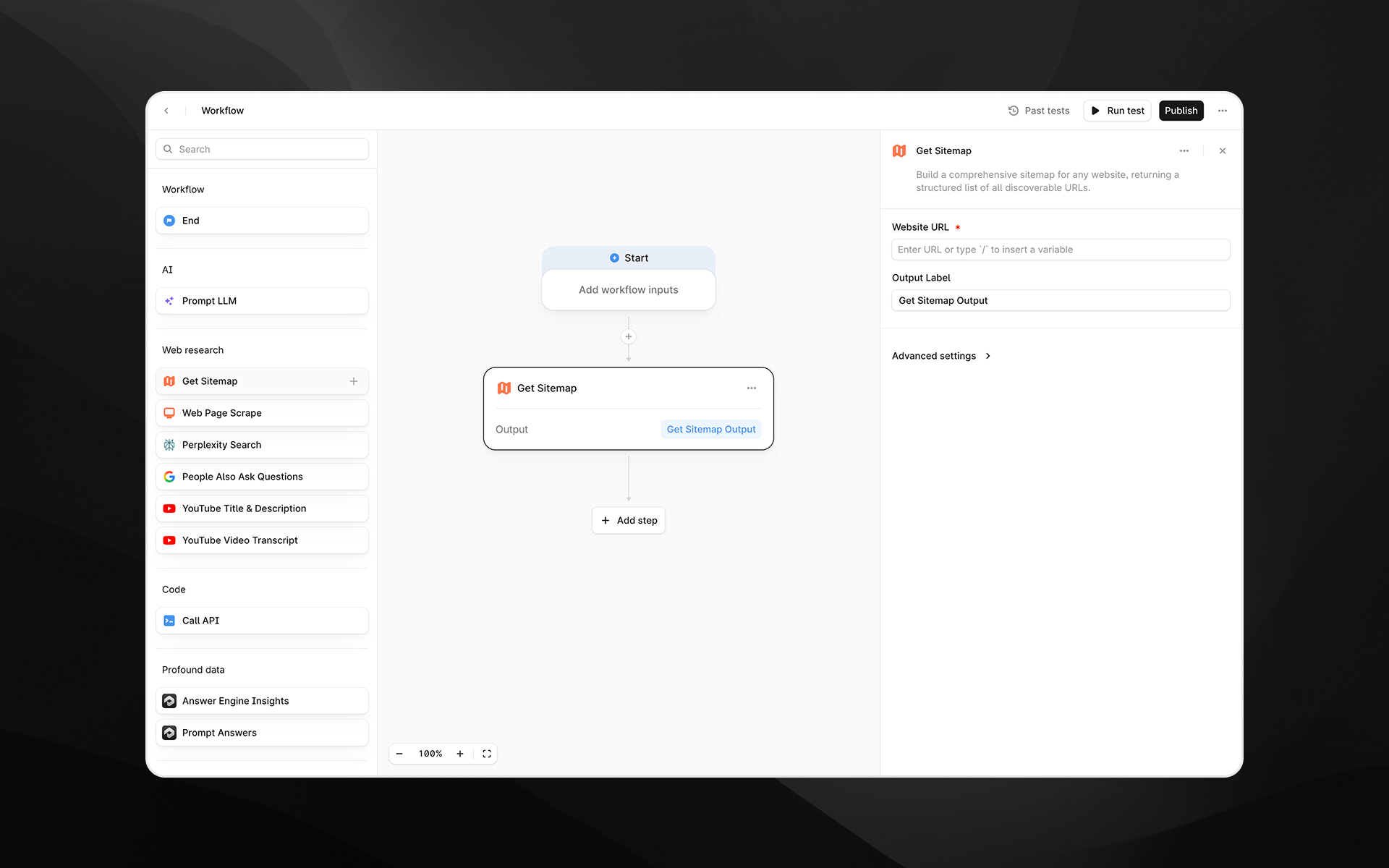
The **Get Sitemap** node builds a comprehensive sitemap for any publicly accessible website. It returns a structured list of all discoverable URLs, giving you a complete view of a site's content footprint.
This is useful for research, content audits, competitive analysis, content planning, and feeding large sets of URLs into downstream Workflow steps.
Behind the scenes, this node uses Firecrawl's sitemap and site-mapping capabilities to crawl a domain and return a clean, deduplicated list of URLs, but the process is fully abstracted for you inside Profound.
 ## When to use this node
Use **Get Sitemap** when you want to:
* Audit all URLs on your own site or a competitor’s
* Identify content gaps or opportunities for AEO
* Build Workflows that automatically analyze or summarize entire sites
* Retrieve source URLs for bulk scraping, bulk insights, or large-scale content research
* Feed multiple URLs into LLM steps for comparison, clustering, or extraction
* Conduct technical/SEO reviews or map site hierarchy
This is a foundational node for building AEO-aware research pipelines.
## Node configuration
### Website URL (required)
Enter the base URL of the website you want to map.
Examples:
* `https://example.com`
* `https://www.competitor-site.com`
* `https://docs.example.com`
The node will crawl the domain starting from this URL and attempt to discover all reachable pages.
You can type the URL directly or use `/` to insert variables from earlier Workflow steps.
### Output Label
Provide a name for the node's result, such as:
* `sitemap`
* `site_urls`
* `mapped_pages`
This label will reference the sitemap output in later steps.
## Advanced settings
Expand **Advanced settings** to configure crawl depth and filtering.
### Search Query
Allows you to filter the sitemap results by keyword.
Examples:
* `blog`
* `pricing`
* `case-study`
* `ai`
This is helpful when you only want URLs matching a specific topic or section of the site.
### Maximum Results
Limits the number of URLs returned.
## When to use this node
Use **Get Sitemap** when you want to:
* Audit all URLs on your own site or a competitor’s
* Identify content gaps or opportunities for AEO
* Build Workflows that automatically analyze or summarize entire sites
* Retrieve source URLs for bulk scraping, bulk insights, or large-scale content research
* Feed multiple URLs into LLM steps for comparison, clustering, or extraction
* Conduct technical/SEO reviews or map site hierarchy
This is a foundational node for building AEO-aware research pipelines.
## Node configuration
### Website URL (required)
Enter the base URL of the website you want to map.
Examples:
* `https://example.com`
* `https://www.competitor-site.com`
* `https://docs.example.com`
The node will crawl the domain starting from this URL and attempt to discover all reachable pages.
You can type the URL directly or use `/` to insert variables from earlier Workflow steps.
### Output Label
Provide a name for the node's result, such as:
* `sitemap`
* `site_urls`
* `mapped_pages`
This label will reference the sitemap output in later steps.
## Advanced settings
Expand **Advanced settings** to configure crawl depth and filtering.
### Search Query
Allows you to filter the sitemap results by keyword.
Examples:
* `blog`
* `pricing`
* `case-study`
* `ai`
This is helpful when you only want URLs matching a specific topic or section of the site.
### Maximum Results
Limits the number of URLs returned.
Default: **100**
Set this higher or lower depending on your use case:
* **100–500** for competitive research
* **500–2,000** for large content audits
* **10–50** for quick sampling or lightweight Workflows
## Output
The node returns a structured list of URLs in a clean, machine-readable format.
Each entry typically includes:
* The page URL
* Basic metadata discovered during crawling
* Normalized and deduplicated links
This output can be consumed directly by:
* [Web Page Scrape node](/agents/workflows/nodes/web-page-scrape)
* [Perplexity Search node](/agents/workflows/nodes/perplexity-search)
* [Prompt LLM node](/agents/workflows/nodes/prompt-llm)
* [Profound data nodes](/agents/workflows/nodes/data/visibility-score)
* Custom analysis or extraction steps
## Example usage
### 1. Build a full competitor content audit
1. Add **Get Sitemap** with `https://competitor.com`
2. Feed output into [Web Page Scrape](/agents/workflows/nodes/web-page-scrape) using a loop or batched Workflow
3. Analyze patterns using [Prompt LLM](/agents/workflows/nodes/prompt-llm) (e.g., topics, structure, gaps)
4. Generate a research report or summary
### 2. Identify content gaps for AEO
1. Use **Get Sitemap** to list all pages on your site
2. Use [Citation Pages](/agents/workflows/nodes/data/citation-pages) to see which pages are cited
3. Use [Prompt LLM](/agents/workflows/nodes/prompt-llm) to identify pages **not** appearing in answer engines
4. Generate recommendations or content improvements
### 3. Large-scale content generation
1. Retrieve a site’s URLs
2. Filter using the Search Query field (e.g., `/blog`)
3. Feed selected URLs into a [Create Content Brief](/agents/workflows/nodes/content-creation/create-content-brief) or [Generate Article](/agents/workflows/nodes/content-creation/generate-article) chain
4. Produce updated or derivative content at scale
## Best practices
* Start with a reasonable limit (e.g., 200 URLs) before scaling up, especially for large sites.
* Use **Search Query** to narrow results when you only need a subset of the content.
* Combine with [Prompt LLM](/agents/workflows/nodes/prompt-llm) to cluster or categorize URLs.
* For large enterprise websites, run multiple Get Sitemap nodes with different starting URLs (e.g., `/blog`, `/products`, `/docs`).
* Use descriptive output labels when chaining multiple sitemap operations.