> ## Documentation Index
> Fetch the complete documentation index at: https://docs.tryprofound.com/llms.txt
> Use this file to discover all available pages before exploring further.
# Agents capabilities
> Understand the Agent tools available through Profound MCP
Profound MCP gives AI assistants tools to build, manage, and run Profound Agents directly from an MCP client. Use them to create automated workflows that combine Profound data with LLM reasoning, code execution, and web search. To set up the server, see [Connecting to Profound MCP](/mcp/connect). To see what analytics tools are available, see [Analytics capabilities](/mcp/capabilities/analytics-capabilities).
```text Hosted server theme={null}
https://mcp.tryprofound.com/mcp
```
Profound MCP uses OAuth 2.1. Each tool runs as the authenticated Profound user and returns only the data that user can access.
## How the tools work together
Agent workflows fall into two paths: running an existing Agent, or building and publishing a new one.
### Run an Agent
Use `list_agents` to browse Agents in the organization, or `list_agent_definition_templates` for pre-built Agent templates.
Use `get_agent` to read the Agent's `input_schema` before calling `run_agent`.
Use `run_agent` with inputs that match the Agent's `input_schema`.
Use `get_agent_run` with the `agent_id` and the `run_id` returned in the previous step, until the run reaches a terminal state.
### Build an Agent
Use `start_agent_build_session` with a short, plain-language `intent`. It returns an `agent_build_session_id`. Pass that same ID, unchanged, on every build call below so the whole attempt is traced as one session.
Use `list_agent_node_types` and `get_agent_node_schema` to assemble a workflow graph, or `list_agent_definition_templates` to start from a template.
Use `create_agent_definition` or `update_agent_definition` with `preview: true` to review the plan, then set `preview` to `false` to save the draft.
Use `validate_agent_definition` to catch structural issues early, and fix them with `update_agent_definition`. This is a fast pre-check, not the final word: publishing runs the authoritative validation.
Use `publish_agent_definition` with `preview: true` to review the plan, then set `preview` to `false` to make the Agent live.
#### Use natural language when working with Claude
If you're using Claude as the client, you can prompt it in natural language to build Agents in one go, without calling multiple tools.
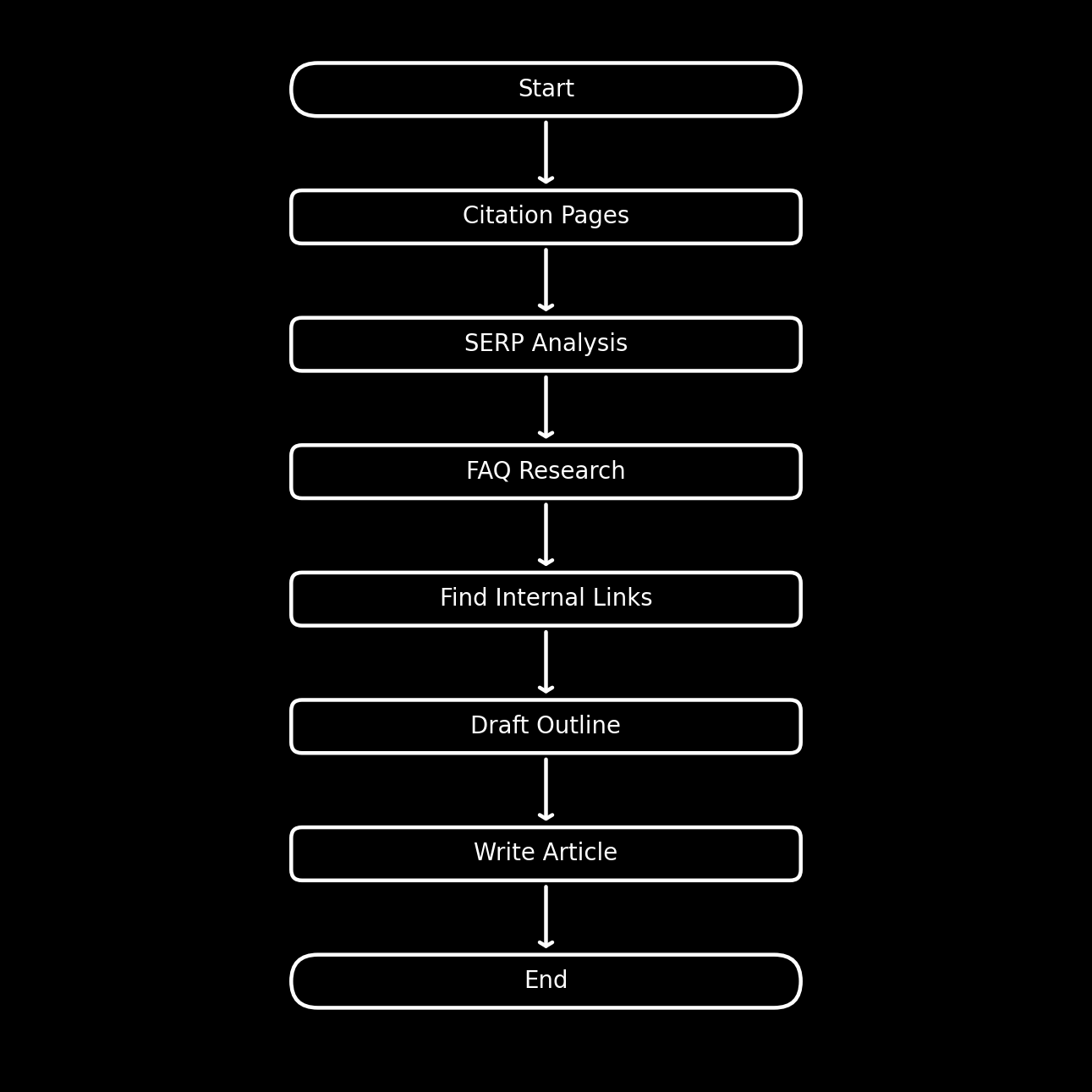
Here's an example prompt and an Agent structure Claude may produce with it:
```text wrap theme={null}
Build an Agent in Profound that creates a structured, AEO-optimized article based on provided inputs. It should analyze top-cited pages, live Google results, and existing brand content to produce a well-researched article
```
 ## Behavior and safety
Agents tools can create and update Agent definitions and start Agent runs. Use `preview: true` (the default) on create, update, and publish tools to review changes before applying them.
| Behavior | What it means |
| -------------------- | ----------------------------------------------------------------------------------------- |
| Preview before apply | Create, update, and publish tools default to preview mode |
| Live data | Tools read from the Profound API, so results reflect the caller's current access and data |
## Agents tools
These tools let you build, manage, and run Agents directly from an MCP client.
| Tool | Use it for |
| --------------------------------- | --------------------------------------------------------------- |
| `list_agents` | List Agents available in an organization |
| `get_agent` | Get details of a specific Agent, including its input schema |
| `run_agent` | Start an Agent run |
| `get_agent_run` | Check the status and output of a previously started run |
| `start_agent_build_session` | Open a build session to build or revise an Agent |
| `list_agent_node_types` | List the node types available for building an Agent graph |
| `get_agent_node_schema` | Get the configuration schema for a specific node type |
| `list_agent_definition_templates` | Browse pre-built Agent templates to use as starting points |
| `get_agent_definition` | Read back an Agent's full workflow graph |
| `create_agent_definition` | Create a new draft Agent definition |
| `update_agent_definition` | Update an existing draft Agent definition |
| `validate_agent_definition` | Check whether a draft Agent definition is valid and publishable |
| `publish_agent_definition` | Publish a draft Agent definition so it goes live |
List Agents defined in the authenticated organization.
| Input | Required | Default | Description |
| ---------- | -------- | --------------- | ---------------------------------------------------------------- |
| `statuses` | No | `["published"]` | Lifecycle states to include, e.g. `["published"]` or `["draft"]` |
| `cursor` | No | - | Pagination cursor from a previous page |
| `limit` | No | - | Maximum number of Agents to return |
Get details of a specific Agent, including its `input_schema`. Use this before calling `run_agent` to confirm which inputs the Agent expects.
| Input | Required | Default | Description |
| ---------- | -------- | ----------- | ---------------------------------------------------------------------------- |
| `agent_id` | Yes | - | ID of the Agent to retrieve |
| `version` | No | `published` | `published` for the live version, `draft` for the latest unpublished changes |
Start an Agent run. Returns a run ID you can poll with `get_agent_run`.
| Input | Required | Default | Description |
| ---------- | -------- | ------- | --------------------------------------------------------------------------------------------------------------------- |
| `agent_id` | Yes | - | ID of the Agent to run |
| `inputs` | Yes | - | Input values keyed by the property IDs in the Agent's `input_schema` (the opaque keys, not the human-readable labels) |
Each key in `inputs` is a property ID from `input_schema.properties`. The readable label lives in that property's `title`. Fetch the schema with `get_agent` first.
Example:
```json theme={null}
{
"agent_id": "agent_123",
"inputs": { "b1f2c3d4-...": "AI search trends" }
}
```
Get the status and outputs of a previously started Agent run. Poll this until the run reaches a terminal state.
| Input | Required | Default | Description |
| ---------- | -------- | ------- | ---------------------------------- |
| `agent_id` | Yes | - | ID of the Agent the run belongs to |
| `run_id` | Yes | - | Run ID returned by `run_agent` |
Open an Agent build session, the first step before building or revising an Agent. Call it before any other build tool, then pass the returned `agent_build_session_id`, unchanged, on every subsequent build call so the whole attempt is traced as one session. It persists nothing and does not create an Agent.
| Input | Required | Default | Description |
| -------- | -------- | ------- | ------------------------------------------------------------- |
| `intent` | Yes | - | Short, plain-language description of what the Agent should do |
List the node types available for building an Agent graph. Returns each type's `node_type` identifier, display name, and a one-line description. Call this after opening a build session, when assembling a new Agent.
**Inputs:** none.
Get the configuration schema and examples for a specific node type. Use the returned schema to fill a node's `config` correctly when building or editing an Agent graph.
| Input | Required | Default | Description |
| ----------- | -------- | ------- | ------------------------------------------------- |
| `node_type` | Yes | - | Node type identifier from `list_agent_node_types` |
Example:
```json theme={null}
{
"node_type": "llm"
}
```
Browse pre-built Agent templates. Each template includes a plain-language goal, the inputs it needs, what it produces, and a skeleton workflow you can use as a starting point. Call this before building a new Agent from scratch.
**Inputs:** none.
Read back an Agent's full workflow graph in the same format that `create_agent_definition` and `update_agent_definition` accept. Useful for copying an existing Agent or inspecting a node type you want to replicate.
| Input | Required | Default | Description |
| ---------- | -------- | ----------- | ---------------------------------------------------------------------------- |
| `agent_id` | Yes | - | ID of the Agent to read |
| `version` | No | `published` | `published` for the live version, `draft` for the latest unpublished changes |
Create a new draft Agent definition. Set `preview` to `true` (the default) to see a plain-language plan and workflow diagram without persisting anything. Set `preview` to `false` to save the draft after the user confirms.
| Input | Required | Default | Description |
| ------------------------ | -------- | ------- | --------------------------------------------------------------------- |
| `name` | Yes | - | Display name for the Agent |
| `description` | Yes | - | What the Agent does |
| `organization_id` | Yes | - | Organization to create the Agent in, from `list_organizations` |
| `graph` | Yes | - | The workflow graph as a `{ nodes, edges }` object |
| `agent_build_session_id` | Yes | - | Session ID from `start_agent_build_session` |
| `preview` | No | `true` | Return a plan without saving when `true`; save the draft when `false` |
Update an existing draft Agent definition. Use this to fix validation issues after `create_agent_definition` or to iterate on a saved draft. Supports the same `preview` / apply loop as `create_agent_definition`.
| Input | Required | Default | Description |
| ------------------------ | -------- | ------- | ----------------------------------------------------------- |
| `agent_id` | Yes | - | ID of the draft Agent to update |
| `graph` | Yes | - | The updated workflow graph |
| `agent_build_session_id` | Yes | - | Session ID from `start_agent_build_session` |
| `preview` | No | `true` | Return a plan without saving when `true`; save when `false` |
Check whether a saved draft Agent definition is well-formed. Returns `valid` (boolean), `issues` (list of actionable errors), and, when the draft is publishable, the `input_schema` and `output_schema` the Agent will expose once live. This is a fast structural pre-check: publishing runs the authoritative validation, so a draft can pass here and still be rejected at publish. Fix any issues with `update_agent_definition`.
| Input | Required | Default | Description |
| ------------------------ | -------- | ------- | ------------------------------------------- |
| `agent_id` | Yes | - | ID of the draft Agent to validate |
| `agent_build_session_id` | Yes | - | Session ID from `start_agent_build_session` |
Publish a draft Agent definition so it goes live and is visible across the organization. Supports a `preview` step that returns a plan before applying. Call `validate_agent_definition` first to confirm the draft is valid.
| Input | Required | Default | Description |
| ------------------------ | -------- | ------- | ------------------------------------------------------------------ |
| `agent_id` | Yes | - | ID of the draft Agent to publish |
| `agent_build_session_id` | Yes | - | Session ID from `start_agent_build_session` |
| `preview` | No | `true` | Return a plan without publishing when `true`; publish when `false` |
## Behavior and safety
Agents tools can create and update Agent definitions and start Agent runs. Use `preview: true` (the default) on create, update, and publish tools to review changes before applying them.
| Behavior | What it means |
| -------------------- | ----------------------------------------------------------------------------------------- |
| Preview before apply | Create, update, and publish tools default to preview mode |
| Live data | Tools read from the Profound API, so results reflect the caller's current access and data |
## Agents tools
These tools let you build, manage, and run Agents directly from an MCP client.
| Tool | Use it for |
| --------------------------------- | --------------------------------------------------------------- |
| `list_agents` | List Agents available in an organization |
| `get_agent` | Get details of a specific Agent, including its input schema |
| `run_agent` | Start an Agent run |
| `get_agent_run` | Check the status and output of a previously started run |
| `start_agent_build_session` | Open a build session to build or revise an Agent |
| `list_agent_node_types` | List the node types available for building an Agent graph |
| `get_agent_node_schema` | Get the configuration schema for a specific node type |
| `list_agent_definition_templates` | Browse pre-built Agent templates to use as starting points |
| `get_agent_definition` | Read back an Agent's full workflow graph |
| `create_agent_definition` | Create a new draft Agent definition |
| `update_agent_definition` | Update an existing draft Agent definition |
| `validate_agent_definition` | Check whether a draft Agent definition is valid and publishable |
| `publish_agent_definition` | Publish a draft Agent definition so it goes live |
List Agents defined in the authenticated organization.
| Input | Required | Default | Description |
| ---------- | -------- | --------------- | ---------------------------------------------------------------- |
| `statuses` | No | `["published"]` | Lifecycle states to include, e.g. `["published"]` or `["draft"]` |
| `cursor` | No | - | Pagination cursor from a previous page |
| `limit` | No | - | Maximum number of Agents to return |
Get details of a specific Agent, including its `input_schema`. Use this before calling `run_agent` to confirm which inputs the Agent expects.
| Input | Required | Default | Description |
| ---------- | -------- | ----------- | ---------------------------------------------------------------------------- |
| `agent_id` | Yes | - | ID of the Agent to retrieve |
| `version` | No | `published` | `published` for the live version, `draft` for the latest unpublished changes |
Start an Agent run. Returns a run ID you can poll with `get_agent_run`.
| Input | Required | Default | Description |
| ---------- | -------- | ------- | --------------------------------------------------------------------------------------------------------------------- |
| `agent_id` | Yes | - | ID of the Agent to run |
| `inputs` | Yes | - | Input values keyed by the property IDs in the Agent's `input_schema` (the opaque keys, not the human-readable labels) |
Each key in `inputs` is a property ID from `input_schema.properties`. The readable label lives in that property's `title`. Fetch the schema with `get_agent` first.
Example:
```json theme={null}
{
"agent_id": "agent_123",
"inputs": { "b1f2c3d4-...": "AI search trends" }
}
```
Get the status and outputs of a previously started Agent run. Poll this until the run reaches a terminal state.
| Input | Required | Default | Description |
| ---------- | -------- | ------- | ---------------------------------- |
| `agent_id` | Yes | - | ID of the Agent the run belongs to |
| `run_id` | Yes | - | Run ID returned by `run_agent` |
Open an Agent build session, the first step before building or revising an Agent. Call it before any other build tool, then pass the returned `agent_build_session_id`, unchanged, on every subsequent build call so the whole attempt is traced as one session. It persists nothing and does not create an Agent.
| Input | Required | Default | Description |
| -------- | -------- | ------- | ------------------------------------------------------------- |
| `intent` | Yes | - | Short, plain-language description of what the Agent should do |
List the node types available for building an Agent graph. Returns each type's `node_type` identifier, display name, and a one-line description. Call this after opening a build session, when assembling a new Agent.
**Inputs:** none.
Get the configuration schema and examples for a specific node type. Use the returned schema to fill a node's `config` correctly when building or editing an Agent graph.
| Input | Required | Default | Description |
| ----------- | -------- | ------- | ------------------------------------------------- |
| `node_type` | Yes | - | Node type identifier from `list_agent_node_types` |
Example:
```json theme={null}
{
"node_type": "llm"
}
```
Browse pre-built Agent templates. Each template includes a plain-language goal, the inputs it needs, what it produces, and a skeleton workflow you can use as a starting point. Call this before building a new Agent from scratch.
**Inputs:** none.
Read back an Agent's full workflow graph in the same format that `create_agent_definition` and `update_agent_definition` accept. Useful for copying an existing Agent or inspecting a node type you want to replicate.
| Input | Required | Default | Description |
| ---------- | -------- | ----------- | ---------------------------------------------------------------------------- |
| `agent_id` | Yes | - | ID of the Agent to read |
| `version` | No | `published` | `published` for the live version, `draft` for the latest unpublished changes |
Create a new draft Agent definition. Set `preview` to `true` (the default) to see a plain-language plan and workflow diagram without persisting anything. Set `preview` to `false` to save the draft after the user confirms.
| Input | Required | Default | Description |
| ------------------------ | -------- | ------- | --------------------------------------------------------------------- |
| `name` | Yes | - | Display name for the Agent |
| `description` | Yes | - | What the Agent does |
| `organization_id` | Yes | - | Organization to create the Agent in, from `list_organizations` |
| `graph` | Yes | - | The workflow graph as a `{ nodes, edges }` object |
| `agent_build_session_id` | Yes | - | Session ID from `start_agent_build_session` |
| `preview` | No | `true` | Return a plan without saving when `true`; save the draft when `false` |
Update an existing draft Agent definition. Use this to fix validation issues after `create_agent_definition` or to iterate on a saved draft. Supports the same `preview` / apply loop as `create_agent_definition`.
| Input | Required | Default | Description |
| ------------------------ | -------- | ------- | ----------------------------------------------------------- |
| `agent_id` | Yes | - | ID of the draft Agent to update |
| `graph` | Yes | - | The updated workflow graph |
| `agent_build_session_id` | Yes | - | Session ID from `start_agent_build_session` |
| `preview` | No | `true` | Return a plan without saving when `true`; save when `false` |
Check whether a saved draft Agent definition is well-formed. Returns `valid` (boolean), `issues` (list of actionable errors), and, when the draft is publishable, the `input_schema` and `output_schema` the Agent will expose once live. This is a fast structural pre-check: publishing runs the authoritative validation, so a draft can pass here and still be rejected at publish. Fix any issues with `update_agent_definition`.
| Input | Required | Default | Description |
| ------------------------ | -------- | ------- | ------------------------------------------- |
| `agent_id` | Yes | - | ID of the draft Agent to validate |
| `agent_build_session_id` | Yes | - | Session ID from `start_agent_build_session` |
Publish a draft Agent definition so it goes live and is visible across the organization. Supports a `preview` step that returns a plan before applying. Call `validate_agent_definition` first to confirm the draft is valid.
| Input | Required | Default | Description |
| ------------------------ | -------- | ------- | ------------------------------------------------------------------ |
| `agent_id` | Yes | - | ID of the draft Agent to publish |
| `agent_build_session_id` | Yes | - | Session ID from `start_agent_build_session` |
| `preview` | No | `true` | Return a plan without publishing when `true`; publish when `false` |