> ## Documentation Index
> Fetch the complete documentation index at: https://docs.tryprofound.com/llms.txt
> Use this file to discover all available pages before exploring further.
# Authentication
> Learn how to authenticate API requests securely
The API is available to Enterprise plan customers only.
The API is currently in beta phase. To access it, you must request access through our support team. We appreciate your understanding and patience as we work to improve the API.
## Overview
To authenticate your API requests, you need an API key. This key identifies and authorizes your requests, ensuring only authorized users can access resources.
Your API key provides access to all data available to your organization, including categories, regions, and category reports.
## Getting Your API Key
Follow these steps to obtain your API key:
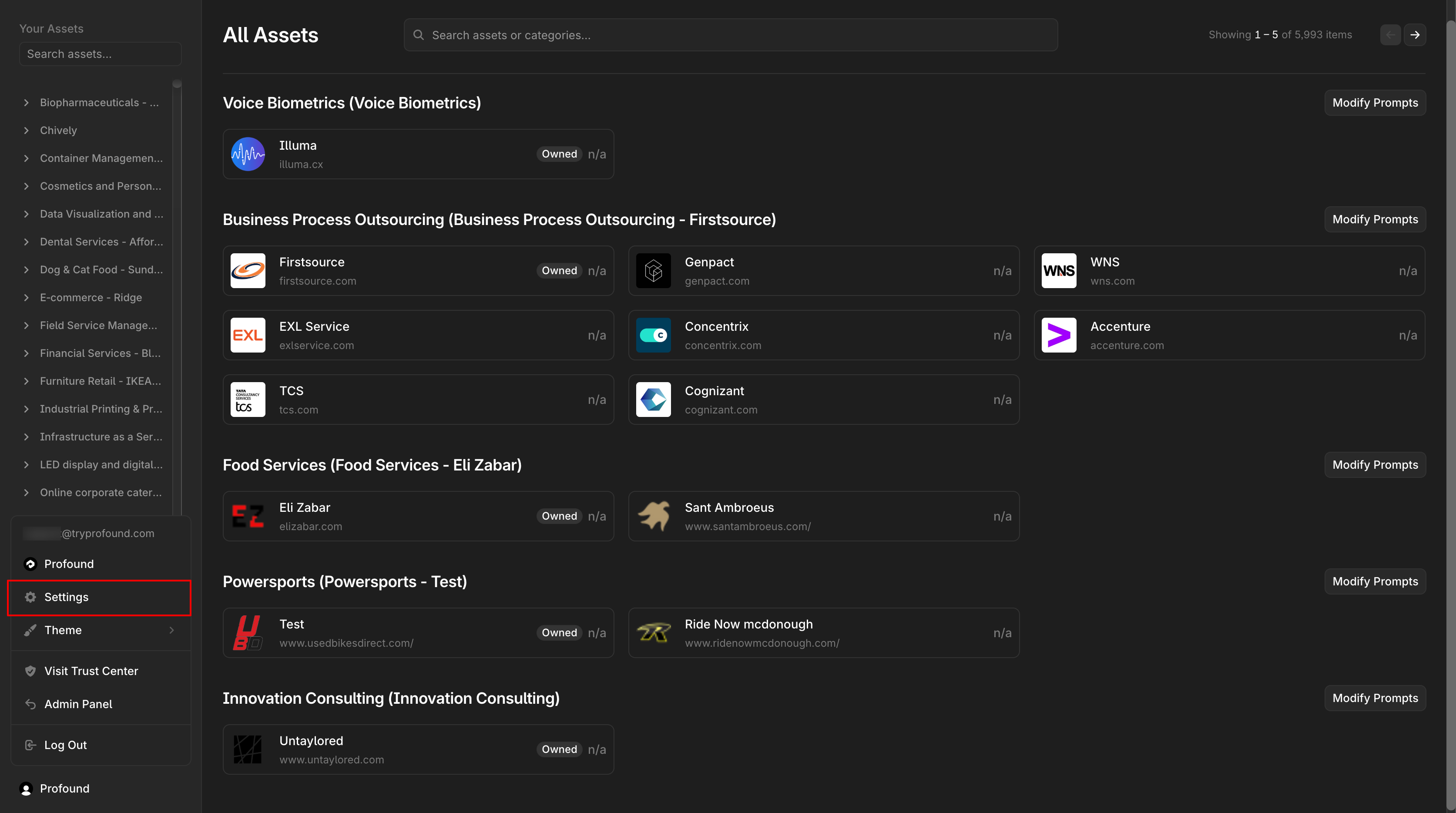
Sign into the platform. In the bottom left, click on your name and select **Settings**
 On the left sidebar, select **API Keys**. This will show your key generation portal and a table of your keys.
If you do not see the **API Keys** tab or are unable to access it, please contact [support](mailto:support@tryprofound.com) to request access.
On the left sidebar, select **API Keys**. This will show your key generation portal and a table of your keys.
If you do not see the **API Keys** tab or are unable to access it, please contact [support](mailto:support@tryprofound.com) to request access.
 In the top banner, enter a **key name** and select an **expiration date**. Note, *the key name must be greater than two characters*.
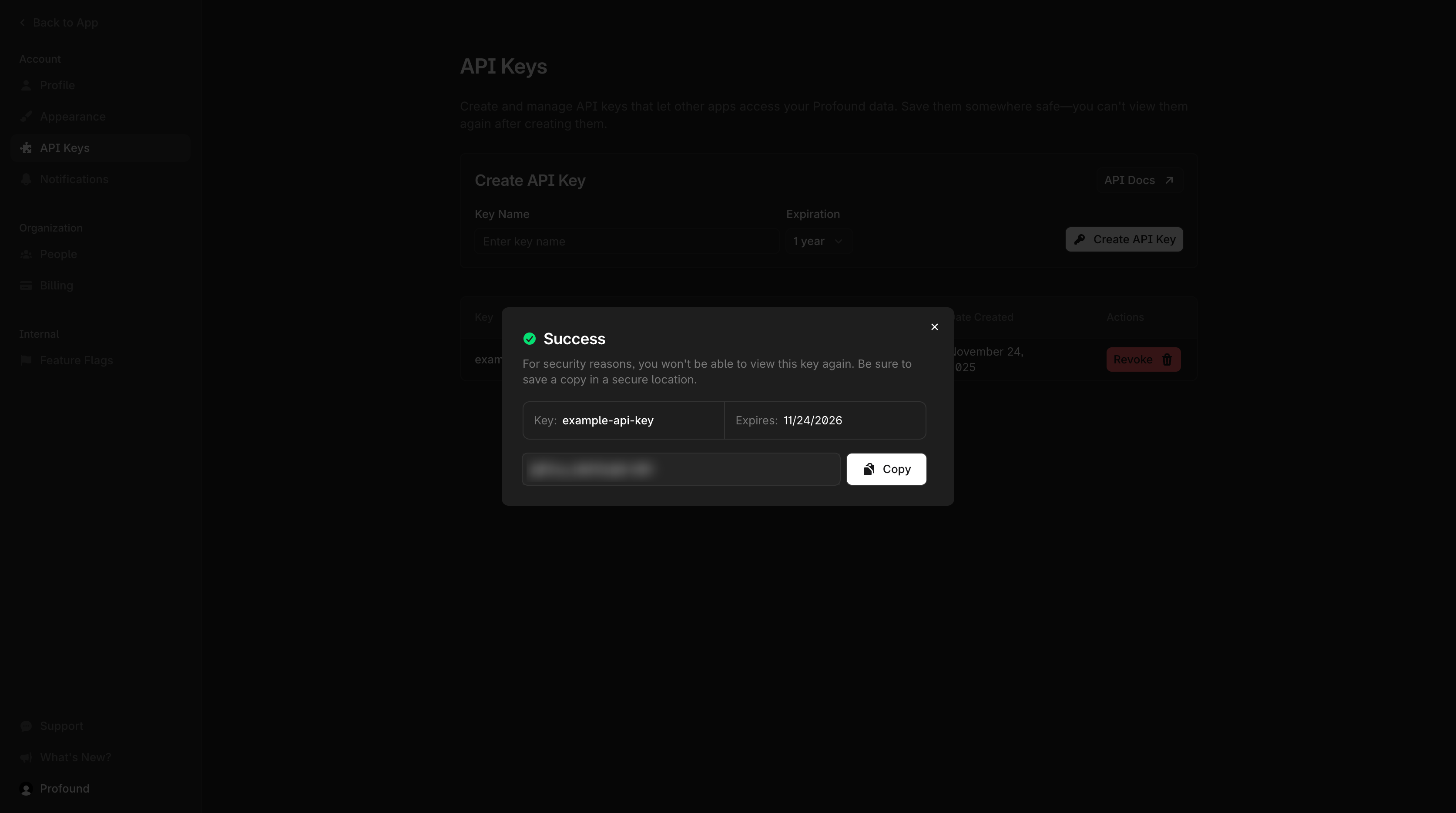
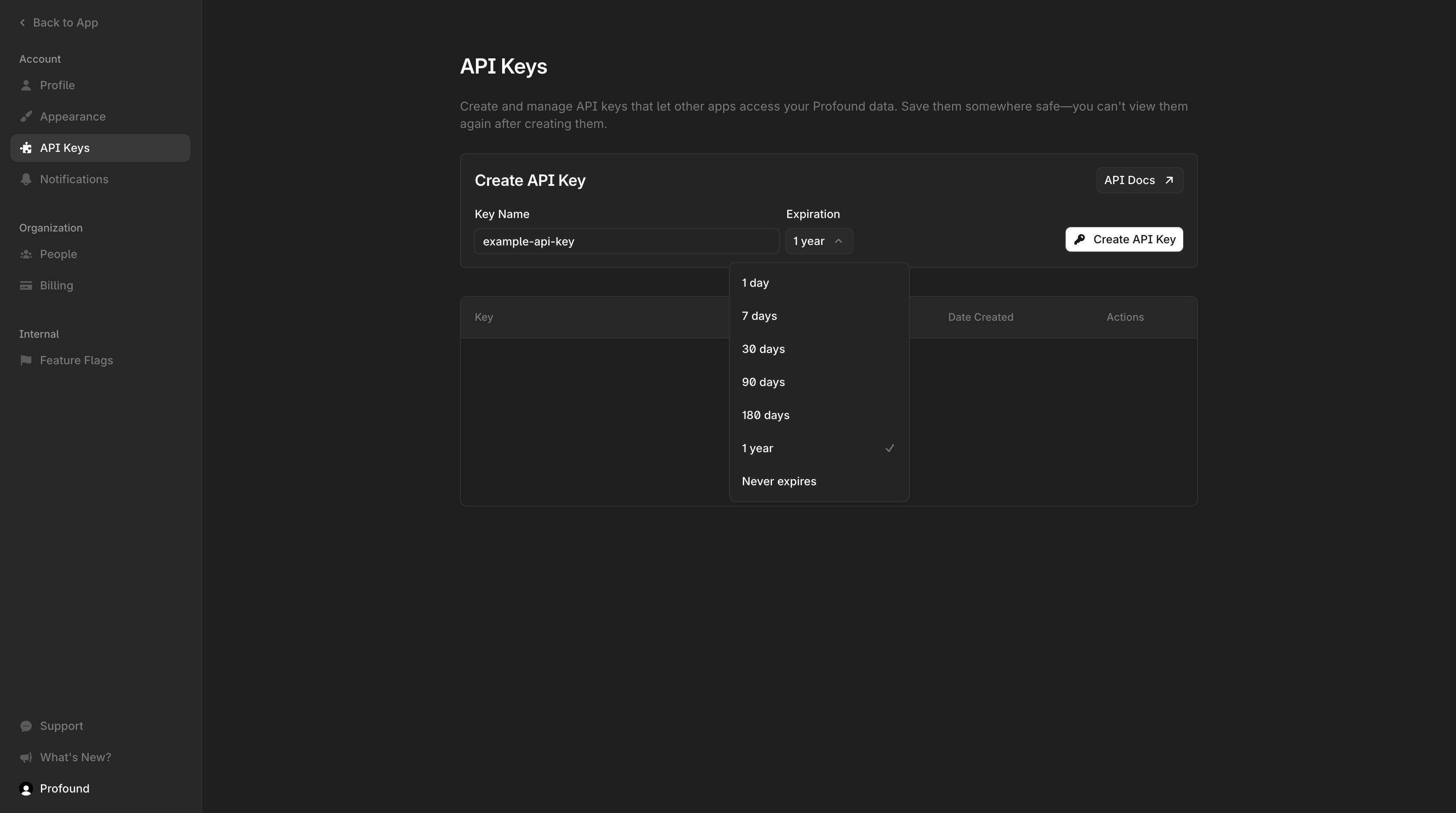 When ready, click **Create API Key** to generate the key. Once complete, the following dialog will be shown.
For added security, **you will not be able to retrieve your key again**. Be sure to copy and store your API key securely before proceeding.
When ready, click **Create API Key** to generate the key. Once complete, the following dialog will be shown.
For added security, **you will not be able to retrieve your key again**. Be sure to copy and store your API key securely before proceeding.
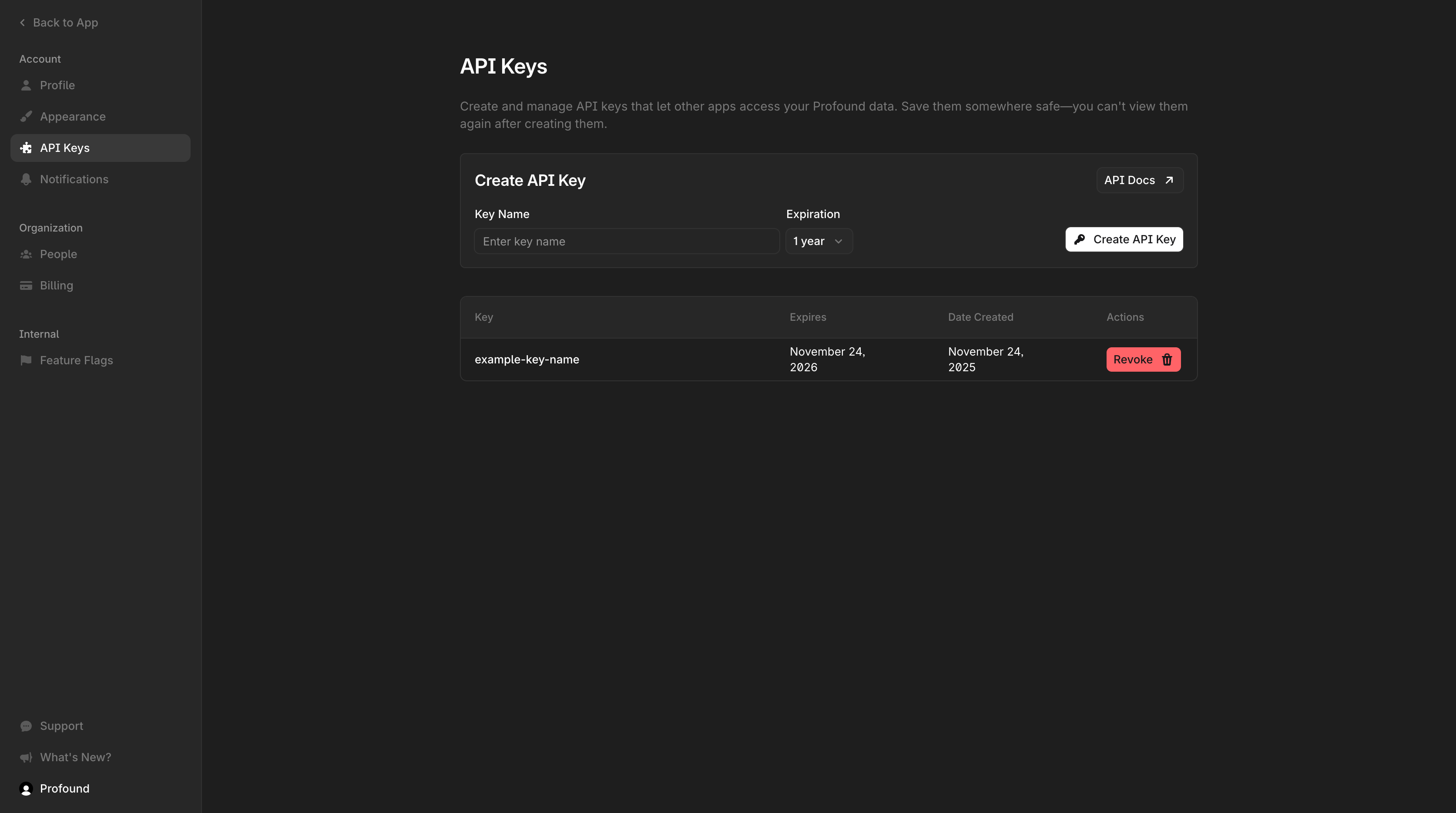
 That's it! You have now generated an API key that can be used to authenticate requests to the Profound API
Your key will be displayed in a table along with other keys you generate. Return to this page at any time to see your keys, check expiry dates, or revoke an existing key.
That's it! You have now generated an API key that can be used to authenticate requests to the Profound API
Your key will be displayed in a table along with other keys you generate. Return to this page at any time to see your keys, check expiry dates, or revoke an existing key.
 Your API key is sensitive information. Never share it publicly or commit it to version control. Store it securely and treat it like a password.
## Authentication Methods
You can authenticate your requests using either method below:
### Header Authentication (Recommended)
Include your API key in the `X-API-Key` header:
```http Header Method theme={null}
POST /v1/reports/visibility HTTP/1.1
Host: api.tryprofound.com
X-API-Key: your_api_key_here
Content-Type: application/json
```
```bash With cURL theme={null}
curl -X POST "https://api.tryprofound.com/v1/reports/visibility" \
-H "X-API-Key: your_api_key_here" \
-H "Content-Type: application/json"
```
### Query Parameter Authentication
Alternatively, include your API key as a query parameter:
```http Query Parameter theme={null}
POST /v1/reports/visibility?api_key=your_api_key_here HTTP/1.1
Host: api.tryprofound.com
Content-Type: application/json
```
```bash With cURL theme={null}
curl -X POST "https://api.tryprofound.com/v1/reports/visibility?api_key=your_api_key_here" \
-H "Content-Type: application/json"
```
## API Key Scope & Permissions
Your API key provides access to:
* **Organization Data**: All data belonging to your organization
* **Categories**: Available data categories and their metadata
* **Regional Data**: Location-based information and filters
* **Reports**: Generated reports and analytics for your categories
* **Raw Data**: Unprocessed data within your accessible categories
## Security Best Practices
* **Keep keys private**: Never expose API keys in client-side code or public repositories
* **Use environment variables**: Store keys in environment variables or secure configuration files
* **Rotate regularly**: Consider rotating your API keys periodically for enhanced security
* **Monitor usage**: Check your API usage regularly to detect any unauthorized access
## Authentication Errors
Common authentication errors and their meanings:
| Status Code | Error | Description |
| ----------------------- | ------------------------ | ---------------------------------------------------------- |
| `401 Unauthorized` | Invalid API key | The provided API key is incorrect or expired |
| `403 Forbidden` | Insufficient permissions | Your API key doesn't have access to the requested resource |
| `429 Too Many Requests` | Rate limit exceeded | You've exceeded your API key rate limit |
## Need Help?
If you encounter authentication issues or need to request API access, contact our support team for assistance.
Your API key is sensitive information. Never share it publicly or commit it to version control. Store it securely and treat it like a password.
## Authentication Methods
You can authenticate your requests using either method below:
### Header Authentication (Recommended)
Include your API key in the `X-API-Key` header:
```http Header Method theme={null}
POST /v1/reports/visibility HTTP/1.1
Host: api.tryprofound.com
X-API-Key: your_api_key_here
Content-Type: application/json
```
```bash With cURL theme={null}
curl -X POST "https://api.tryprofound.com/v1/reports/visibility" \
-H "X-API-Key: your_api_key_here" \
-H "Content-Type: application/json"
```
### Query Parameter Authentication
Alternatively, include your API key as a query parameter:
```http Query Parameter theme={null}
POST /v1/reports/visibility?api_key=your_api_key_here HTTP/1.1
Host: api.tryprofound.com
Content-Type: application/json
```
```bash With cURL theme={null}
curl -X POST "https://api.tryprofound.com/v1/reports/visibility?api_key=your_api_key_here" \
-H "Content-Type: application/json"
```
## API Key Scope & Permissions
Your API key provides access to:
* **Organization Data**: All data belonging to your organization
* **Categories**: Available data categories and their metadata
* **Regional Data**: Location-based information and filters
* **Reports**: Generated reports and analytics for your categories
* **Raw Data**: Unprocessed data within your accessible categories
## Security Best Practices
* **Keep keys private**: Never expose API keys in client-side code or public repositories
* **Use environment variables**: Store keys in environment variables or secure configuration files
* **Rotate regularly**: Consider rotating your API keys periodically for enhanced security
* **Monitor usage**: Check your API usage regularly to detect any unauthorized access
## Authentication Errors
Common authentication errors and their meanings:
| Status Code | Error | Description |
| ----------------------- | ------------------------ | ---------------------------------------------------------- |
| `401 Unauthorized` | Invalid API key | The provided API key is incorrect or expired |
| `403 Forbidden` | Insufficient permissions | Your API key doesn't have access to the requested resource |
| `429 Too Many Requests` | Rate limit exceeded | You've exceeded your API key rate limit |
## Need Help?
If you encounter authentication issues or need to request API access, contact our support team for assistance.