

レポート
- 日次レポート (V1)
- 時間単位レポート (V2)
V1 レポートエンドポイント(
/v1/reports/*)の例です。EST に基づく日次の事前集計データを扱います。
時間単位の粒度が必要な場合は、上部の 時間単位レポート (V2) タブを使用してください。Agent Analytics の Raw ログエンドポイントは廃止されました。実行ごとの Raw の
プロンプト回答行には、
POST /v2/prompts/answers を使用してください。ボットおよびリファラル
トラフィックには、集計済みの /v2/reports/bots および /v2/reports/referrals
エンドポイントを使用してください。- 容量: 集計レポートエンドポイントを使用して、日付範囲全体を 1 回のリクエストで取得できます。
- 粒度: データは日単位でバケット化されます。タイムスタンプは EST における各日の開始時刻に正規化されます。
ボットレポート
- ボットのハイライト
- 日別の引用
- プロバイダー別のページ訪問
ボットの種類別に訪問数を取得します。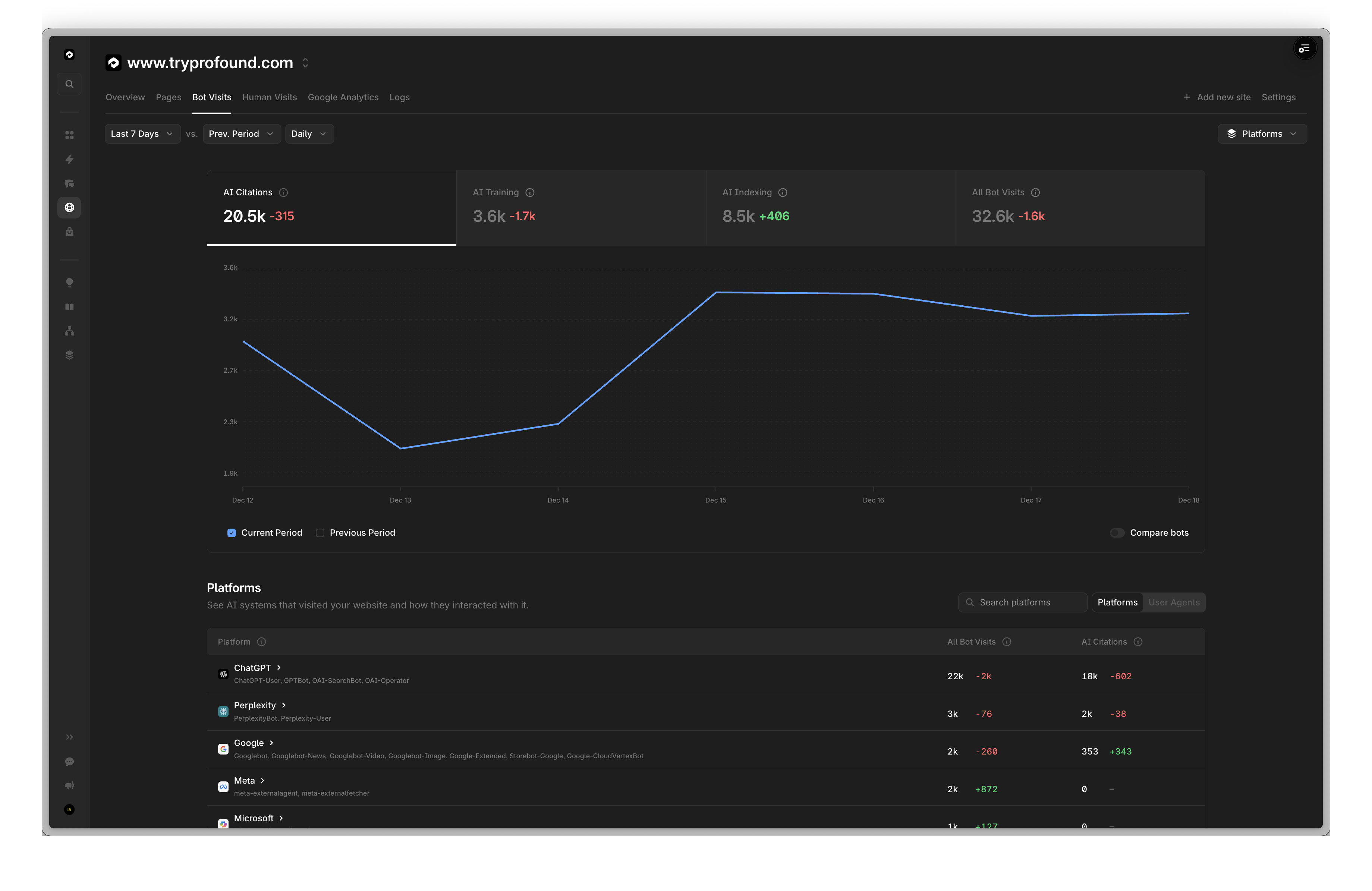
POST /v1/reports/bots HTTP/1.1
Content-Type: application/json
X-API-Key: your_api_key

{
  "domain": "www.tryprofound.com",
  "start_date": "2025-12-12",
  "end_date": "2025-12-18",
  "metrics": ["citations", "training", "indexing"]
}
{
  "info": {},  // removed for brevity
  "data": [
    {
      "metrics": [
        20640,
        8450,
        3646
      ],
      "dimensions": []
    }
  ]
}
ChatGPT の引用数を日別に取得します。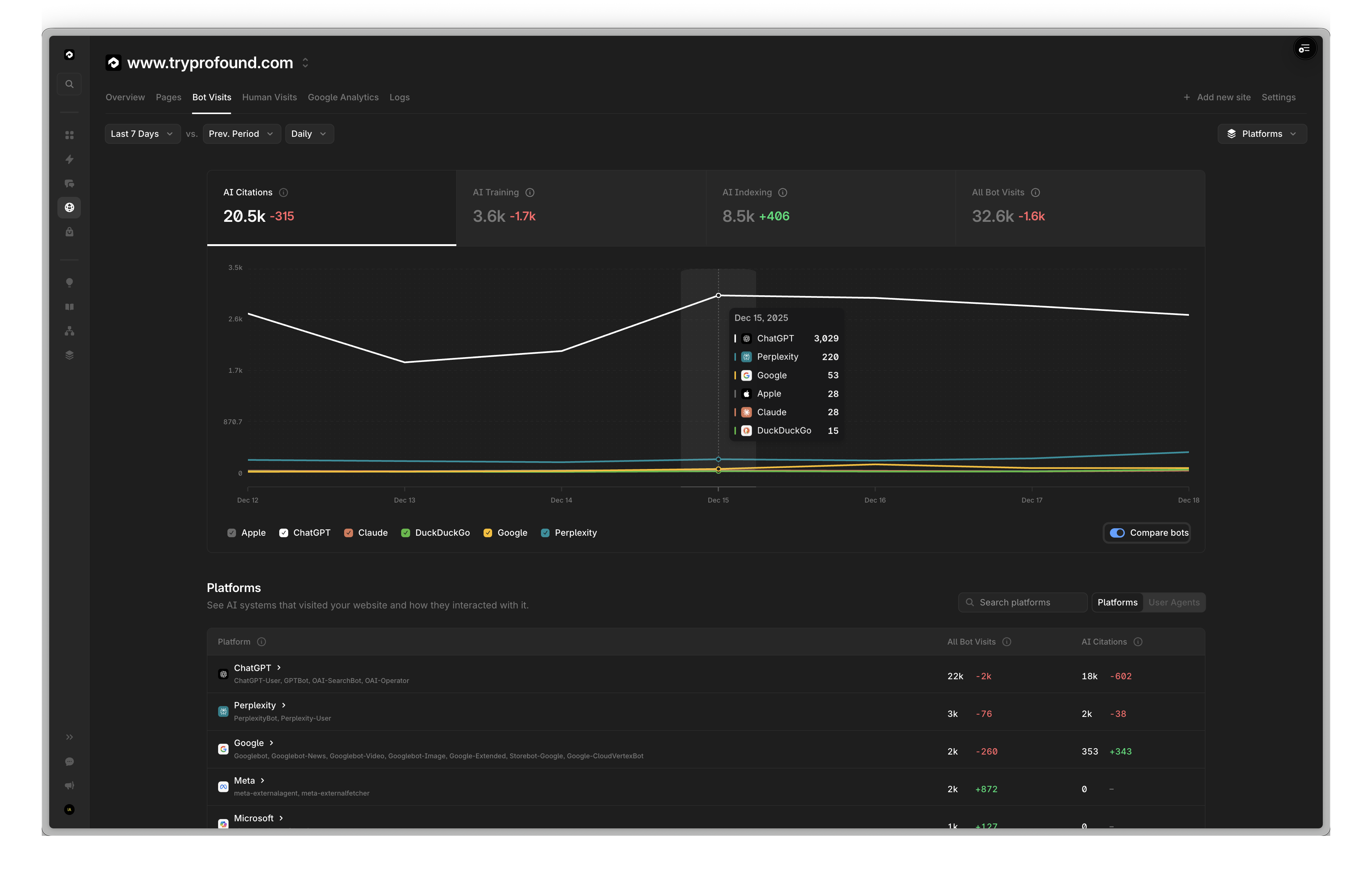
次のように置き換えることで、ボット別に分類された日次の完全なリストを簡単に取得できます。
"dimensions": ["date", "bot_name"],
"filters": [],
POST /v1/reports/bots HTTP/1.1
Content-Type: application/json
X-API-Key: your_api_key

{
  "domain": "www.tryprofound.com",
  "start_date": "2025-12-12",
  "end_date": "2025-12-18",
  "dimensions": ["date"],
  "filters": [
      {"field": "bot_name", "operator": "is", "value": "ChatGPT-User"}
  ],
  "order_by": {
      "date": "desc"
  },
  "metrics": ["citations"]
}
{
    "info": {},  // removed for brevity
    "data": [
        {
            "metrics": [
                2698
            ],
            "dimensions": [
                "2025-12-18"
            ]
        },
        {
            "metrics": [
                2847
            ],
            "dimensions": [
                "2025-12-17"
            ]
        },
        {
            "metrics": [
                2986
            ],
            "dimensions": [
                "2025-12-16"
            ]
        },
        {
            "metrics": [
                3029
            ],
            "dimensions": [
                "2025-12-15"
            ]
        },
        {
            "metrics": [
                2075
            ],
            "dimensions": [
                "2025-12-14"
            ]
        },
        {
            "metrics": [
                1881
            ],
            "dimensions": [
                "2025-12-13"
            ]
        },
        {
            "metrics": [
                2717
            ],
            "dimensions": [
                "2025-12-12"
            ]
        }
    ]
}
プロバイダーに絞り込んで、ボットの種類別にページ訪問数を取得します。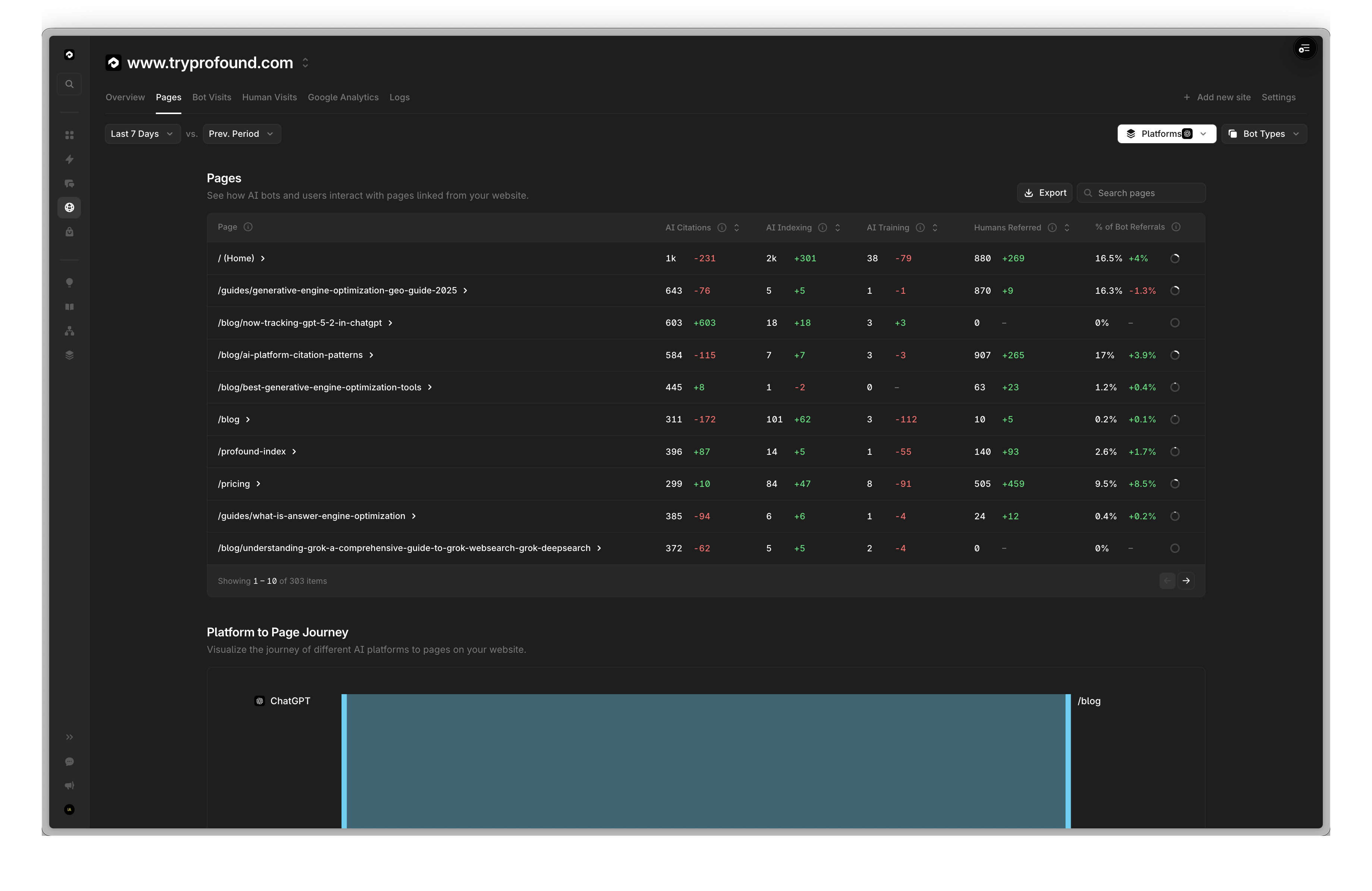
右上の Platforms で OpenAI が選択されていることに注目してください。
フィルターを削除すると、すべてのプロバイダーの指標を確認できます。
POST /v1/reports/bots HTTP/1.1
Content-Type: application/json
X-API-Key: your_api_key

{
  "domain": "www.tryprofound.com",
  "start_date": "2025-12-12",
  "end_date": "2025-12-18",
  "dimensions": ["path"],
  "filters": [
      {"field": "bot_provider", "operator": "is", "value": "openai"}
  ],
  "order_by": {"citations": "desc"},
  "metrics": ["citations", "indexing", "training"],
  "pagination": {
      "limit": 10,
      "offset": 0
  }
}
{
  "info": {},  // removed for brevity
  "data": [
      {
        "metrics": [
          1255,
          1614,
          38
        ],
        "dimensions": [
          "/"
        ]
      },
      {
        "metrics": [
          643,
          5,
          1
        ],
        "dimensions": [
          "/guides/generative-engine-optimization-geo-guide-2025"
        ]
      },
      {
        "metrics": [
          603,
          18,
          3
        ],
        "dimensions": [
          "/blog/now-tracking-gpt-5-2-in-chatgpt"
        ]
      },
      {
        "metrics": [
          584,
          7,
          3
        ],
        "dimensions": [
          "/blog/ai-platform-citation-patterns"
        ]
      },
      {
        "metrics": [
          445,
          1,
          0
        ],
        "dimensions": [
          "/blog/best-generative-engine-optimization-tools"
        ]
      },
      {
        "metrics": [
          396,
          14,
          1
        ],
        "dimensions": [
          "/profound-index"
        ]
      },
      {
      "metrics": [
          385,
          6,
          1
      ],
      "dimensions": [
          "/guides/what-is-answer-engine-optimization"
      ]
      },
      {
        "metrics": [
          376,
          2,
          0
        ],
        "dimensions": [
          "/blog/semrush-ai-visibility-toolkit-review"
        ]
      },
      {
        "metrics": [
          372,
          5,
          2
        ],
        "dimensions": [
          "/blog/understanding-grok-a-comprehensive-guide-to-grok-websearch-grok-deepsearch"
        ]
      },
      {
        "metrics": [
          371,
          7,
          1
        ],
        "dimensions": [
          "/blog/choosing-ai-visibility-provider"
        ]
      }
  ]
}
リファラルレポート
- プラットフォーム別のリファラル
- 日別のボットリファラル
- ページ単位のリファラル
- ボット別のリファラル
プラットフォーム別にリファラル数を取得します。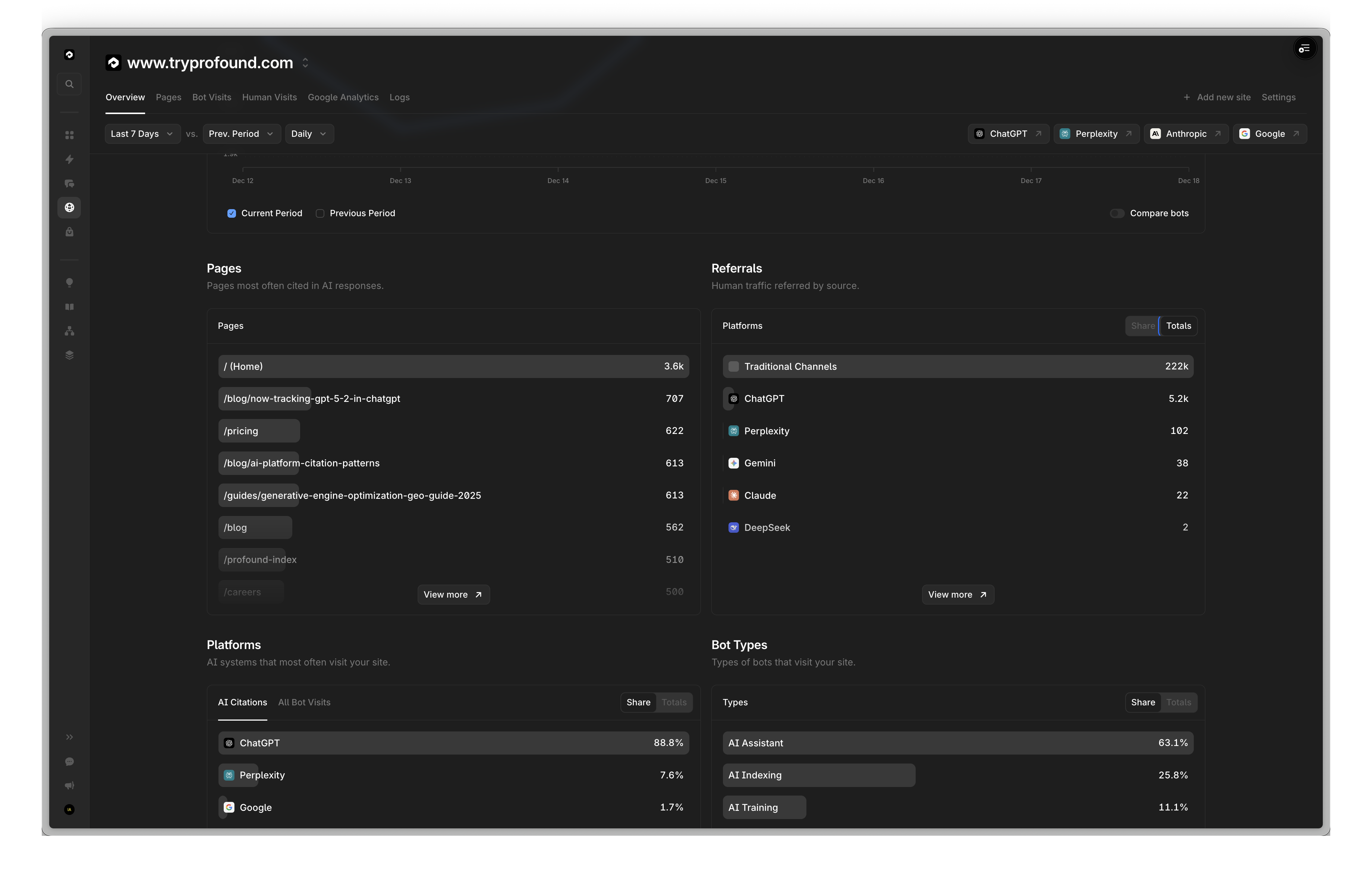
注:
other は、LinkedIn や Facebook などの従来のソースからのリファラルを表します。internal は、ブログ記事から別のブログ記事へのリンクなど、自社 Web サイト内からのリファラルを表します。POST /v1/reports/referrals HTTP/1.1
Content-Type: application/json
X-API-Key: your_api_key
{
"domain": "www.tryprofound.com",
"start_date": "2025-12-12",
"end_date": "2025-12-18",
"dimensions": ["referral_source"],
"filters": [
{"field": "referral_source", "operator": "not_in", "value": ["none", "internal"]}
],
"metrics": ["visits"]
}
{
  "info": {},  // removed for brevity
  "data": [
    {
      "metrics": [
        222022
      ],
      "dimensions": [
        "other"
      ]
    },
    {
      "metrics": [
        5171
      ],
      "dimensions": [
        "openai"
      ]
    },
    {
      "metrics": [
        102
      ],
      "dimensions": [
        "perplexity"
      ]
    },
    {
      "metrics": [
        39
      ],
      "dimensions": [
        "gemini"
      ]
    },
    {
      "metrics": [
        22
      ],
      "dimensions": [
        "anthropic"
      ]
    },
    {
      "metrics": [
        2
      ],
      "dimensions": [
        "deepseek"
      ]
    }
  ]
}
AI ボットからのリファラル数を日別に取得します。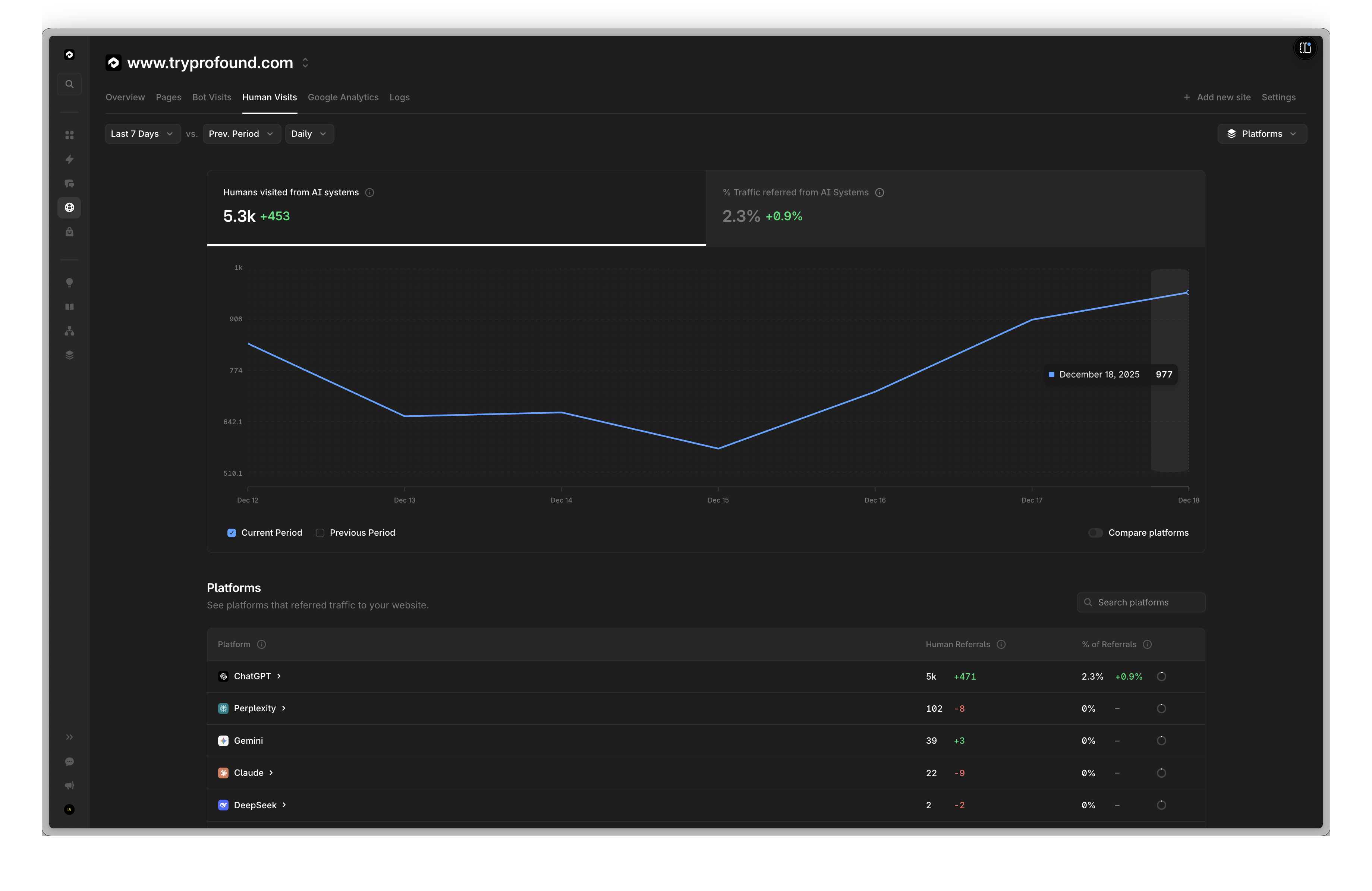
POST /v1/reports/referrals HTTP/1.1
Content-Type: application/json
X-API-Key: your_api_key

{
  "domain": "www.tryprofound.com",
  "start_date": "2025-12-12",
  "end_date": "2025-12-18",
  "dimensions": ["date"],
  "filters": [
    {"field": "referral_source", "operator": "not_in", "value": ["none", "other", "internal"]}
  ],
  "order_by": {"date": "desc"},
  "metrics": ["visits"]
}
{
  "info": {},  // removed for brevity
  "data": [
    {
      "metrics": [
        977
      ],
      "dimensions": [
        "2025-12-18"
      ]
    },
    {
      "metrics": [
        906
      ],
      "dimensions": [
        "2025-12-17"
      ]
    },
    {
      "metrics": [
        719
      ],
      "dimensions": [
        "2025-12-16"
      ]
    },
    {
      "metrics": [
        571
      ],
      "dimensions": [
        "2025-12-15"
      ]
    },
    {
      "metrics": [
        665
      ],
      "dimensions": [
        "2025-12-14"
      ]
    },
    {
      "metrics": [
        655
      ],
      "dimensions": [
        "2025-12-13"
      ]
    },
    {
      "metrics": [
        844
      ],
      "dimensions": [
        "2025-12-12"
      ]
    }
  ]
}
特定のページ別にリファラル数を取得します。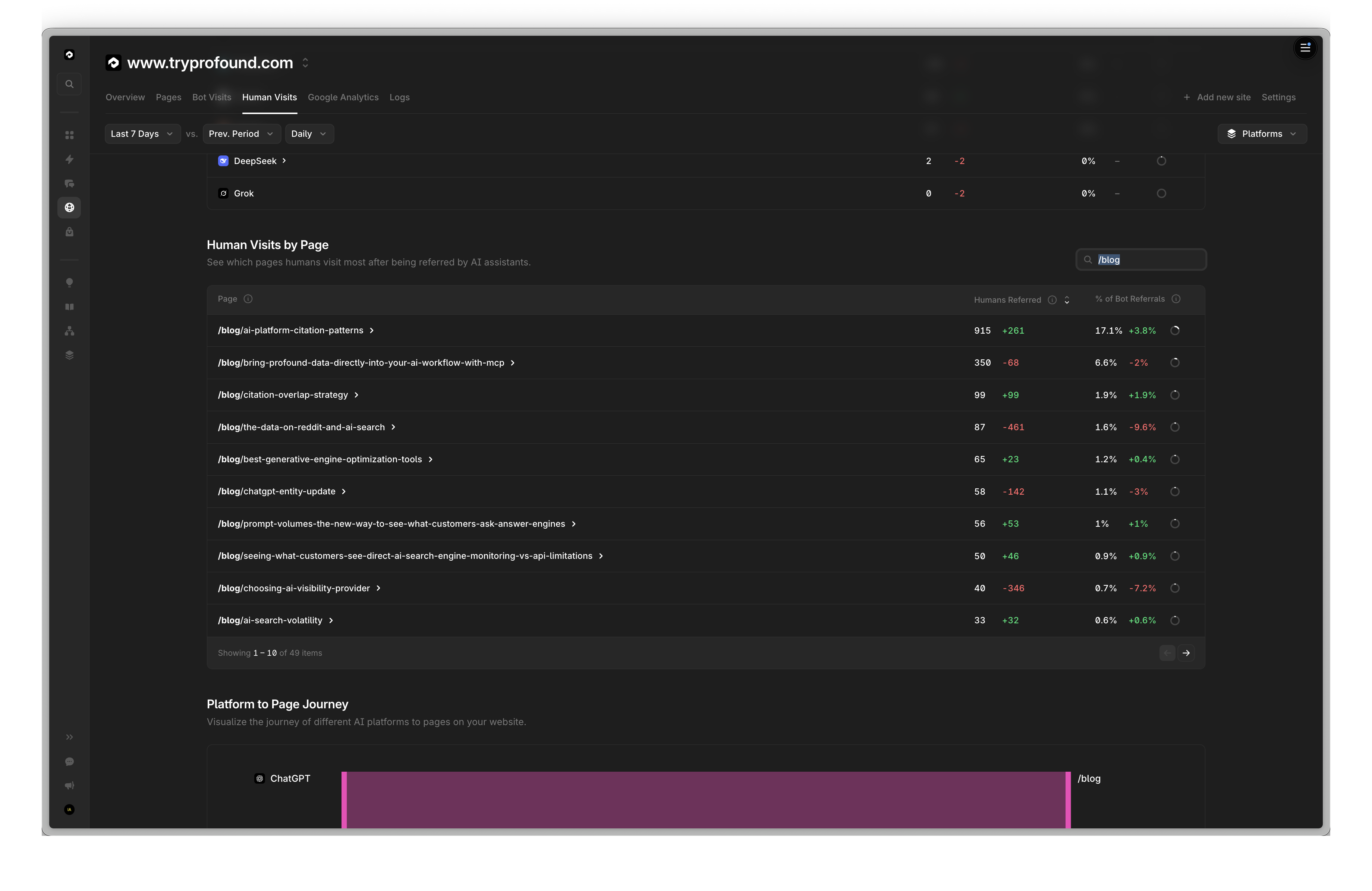
検索バーに
/blog が入力されていることに注目してください。% of Bot Referrals は、リファラルの総数を合計し、各ボットのリファラル数をその合計で割ることで算出できます。
POST /v1/reports/referrals HTTP/1.1
Content-Type: application/json
X-API-Key: your_api_key

{
  "domain": "www.tryprofound.com",
  "start_date": "2025-12-12",
  "end_date": "2025-12-18",
  "dimensions": ["path"],
  "filters": [
    {"field": "referral_source", "operator": "not_in", "value": ["none", "other", "internal"]},
    {"field": "path", "operator": "contains", "value": "/blog"}
  ],
  "metrics": ["visits"],
  "order_by": {"visits": "desc"},
  "pagination": {"limit": 10, "offset": 0}
}
{
  "info": {},  // removed for brevity
  "data": [
    {
      "metrics": [
        915
      ],
      "dimensions": [
        "/blog/ai-platform-citation-patterns"
      ]
    },
    {
      "metrics": [
        350
      ],
      "dimensions": [
        "/blog/bring-profound-data-directly-into-your-ai-workflow-with-mcp"
      ]
    },
    {
      "metrics": [
        99
      ],
      "dimensions": [
        "/blog/citation-overlap-strategy"
      ]
    },
    {
      "metrics": [
        87
      ],
      "dimensions": [
        "/blog/the-data-on-reddit-and-ai-search"
      ]
    },
    {
      "metrics": [
        65
      ],
      "dimensions": [
        "/blog/best-generative-engine-optimization-tools"
      ]
    },
    {
      "metrics": [
        58
      ],
      "dimensions": [
        "/blog/chatgpt-entity-update"
      ]
    },
    {
      "metrics": [
        56
      ],
      "dimensions": [
        "/blog/prompt-volumes-the-new-way-to-see-what-customers-ask-answer-engines"
      ]
    },
    {
      "metrics": [
        50
      ],
      "dimensions": [
        "/blog/seeing-what-customers-see-direct-ai-search-engine-monitoring-vs-api-limitations"
      ]
    },
    {
      "metrics": [
        40
      ],
      "dimensions": [
        "/blog/choosing-ai-visibility-provider"
      ]
    },
    {
      "metrics": [
        33
      ],
      "dimensions": [
        "/blog/ai-search-volatility"
      ]
    }
  ]
}
ボット別にリファラル数を取得します。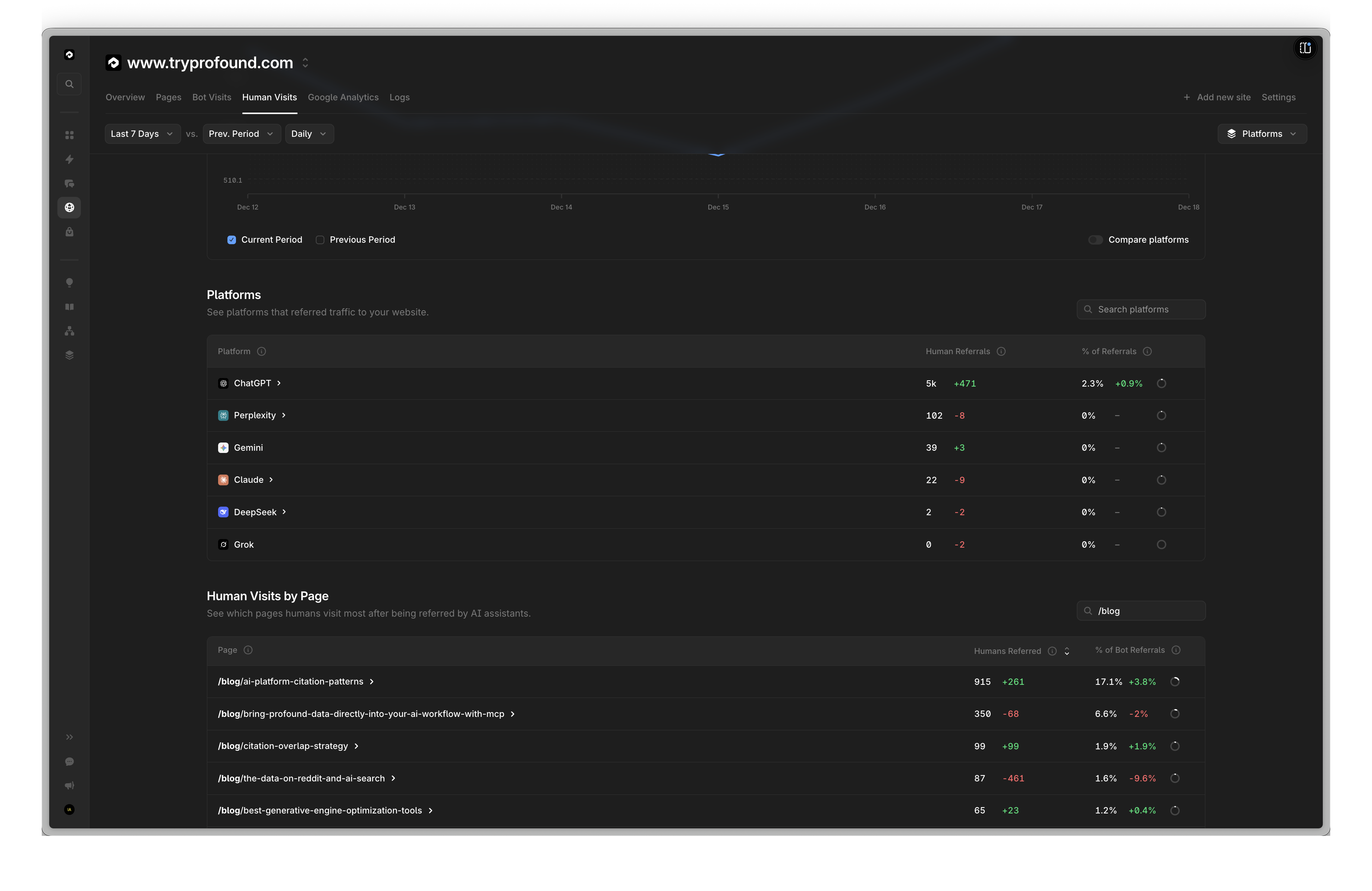
ここでの % of Referrals は、内部以外のソースからのリファラル訪問のうち、このボットからのものが占める割合を意味します。これを算出するには、レスポンス内のリファラルの総数を合計します。
total_referrals = 222126 + 5172 + 102 + 39 + 22 + 2 = 227481次に、各ボットについて、そのリファラル数を合計で割ります。ChatGPT % = (5172 / 227481) * 100 = 2.27%…POST /v1/reports/referrals HTTP/1.1
Content-Type: application/json
X-API-Key: your_api_key
{
"domain": "www.tryprofound.com",
"start_date": "2025-12-12",
"end_date": "2025-12-18",
"dimensions": ["referral_source"],
"filters": [
{"field": "referral_source", "operator": "not_in", "value": ["none", "internal"]}
],
"metrics": ["visits"],
"order_by": {"visits": "desc"}
}
{
  "info": {},  // removed for brevity
  "data": [
    {
      "metrics": [
        222126
      ],
      "dimensions": [
        "other"
      ]
    },
    {
      "metrics": [
        5172
      ],
      "dimensions": [
        "openai"
      ]
    },
    {
      "metrics": [
        102
      ],
      "dimensions": [
        "perplexity"
      ]
    },
    {
      "metrics": [
        39
      ],
      "dimensions": [
        "gemini"
      ]
    },
    {
      "metrics": [
        22
      ],
      "dimensions": [
        "anthropic"
      ]
    },
    {
      "metrics": [
        2
      ],
      "dimensions": [
        "deepseek"
      ]
    }
  ]
}
V2 エンドポイントは、UTC の時間単位でデータをバケット化した時間単位の粒度のレポートを提供します。V1 と同じディメンション、指標、フィルターをすべてサポートしているほか、時間単位のテーブルに固有の新しいフィールドとして、UTM とリファラルのトラフィックの区別も提供します。V1 の日次集計は ET に固定されているため、他のタイムゾーンのユーザーは、自分のローカルの日単位でバケット化されたデータを取得する方法がありませんでした。V2 はこの問題を解決します。データが UTC の時間単位でバケット化されるため、ローカルの日の境界を UTC に変換し、自分の暦日に合わせたデータをクエリできます。
V1 と V2: 日次の事前集計レポート(EST ベース)には 日次レポート (V1) タブを
使用してください。V2 は時間単位の粒度(UTC)向けです。実行ごとの Raw の
プロンプト回答行は
POST /v2/prompts/answers で取得できます。端数オフセットのタイムゾーン: ローカルのタイムゾーンが端数の UTC オフセット(例: IST +5:30、ネパール +5:45)を使用している場合、ローカルの 1 時間は 2 つの UTC 時間バケットにまたがります。時間単位の粒度でクエリする場合は、そのローカルの 1 時間分の完全なデータを取得するために、連続する 2 時間分をリクエストしてください。詳細は 日付範囲とタイムゾーン を参照してください。
ボットレポート
時間単位のボット内訳テーブルから集計したボットトラフィックデータを返します。- ボットのハイライト
- 日別の引用
- プロバイダー別のページ訪問
- 時間別のボットトラフィック
ボットの種類別に訪問数を取得します。
POST /v2/reports/bots HTTP/1.1
Content-Type: application/json
X-API-Key: your_api_key

{
  "domain": "www.tryprofound.com",
  "start_date": "2025-12-12",
  "end_date": "2025-12-18",
  "metrics": ["citations", "training", "indexing"]
}
ChatGPT の引用数を日別に取得します。
POST /v2/reports/bots HTTP/1.1
Content-Type: application/json
X-API-Key: your_api_key

{
  "domain": "www.tryprofound.com",
  "start_date": "2025-12-12",
  "end_date": "2025-12-18",
  "dimensions": ["date"],
  "filters": [
    { "field": "bot_name", "operator": "is", "value": "ChatGPT-User" }
  ],
  "order_by": { "date": "desc" },
  "metrics": ["citations"]
}
特定のプロバイダーについて、引用数の多い上位パスを取得します。
POST /v2/reports/bots HTTP/1.1
Content-Type: application/json
X-API-Key: your_api_key

{
  "domain": "www.tryprofound.com",
  "start_date": "2025-12-12",
  "end_date": "2025-12-18",
  "dimensions": ["path"],
  "filters": [
    { "field": "bot_provider", "operator": "is", "value": "openai" }
  ],
  "order_by": { "citations": "desc" },
  "metrics": ["citations", "indexing", "training"],
  "pagination": { "limit": 10, "offset": 0 }
}
UTC の 1 日分について、時間別のボットトラフィックの内訳を取得します。UTC タイムスタンプを使用して、クエリをローカルの暦日に合わせます。
POST /v2/reports/bots HTTP/1.1
Content-Type: application/json
X-API-Key: your_api_key

{
  "domain": "www.tryprofound.com",
  "start_date": "2025-12-16T00:00:00Z",
  "end_date": "2025-12-16T23:59:59Z",
  "dimensions": ["hour"],
  "metrics": ["count", "citations"],
  "order_by": { "hour": "asc" }
}
リクエストボディ
| フィールド | 型 | 必須 | デフォルト | 説明 |
|---|---|---|---|---|
domain | string | はい | - | クエリ対象のドメイン(例: www.tryprofound.com) |
start_date | string | はい | - | UTC での開始日。YYYY-MM-DD、YYYY-MM-DD HH:MM、YYYY-MM-DD HH:MM:SS、または完全な ISO タイムスタンプを受け付けます |
end_date | string | いいえ | 現在時刻 (UTC) | UTC での終了日。start_date と同じ形式です |
metrics | string[] | はい | - | 返す 1 つ以上の指標(下記参照) |
dimensions | string[] | いいえ | [] | 結果のグループ化に使用するフィールド(下記参照) |
filters | filter[] | いいえ | [] | 結果を絞り込むためのフィルター(下記参照) |
date_interval | string | いいえ | ”day” | date ディメンションのバケットサイズ: “hour” または “day” |
order_by | object | いいえ | 最初の指標の降順 | フィールド → “asc” または “desc” のマップ |
pagination | object | いいえ | limit: 10000, offset: 0 | ページネーションの設定 |
指標
| 指標 | 説明 |
|---|---|
count | ユニークなボット訪問の合計(すべてのボットの種類) |
citations | AI アシスタントボット(例: ChatGPT-User、Perplexity-User)からのユニーク訪問数 |
indexing | Web インデックスボット(例: Googlebot、bingbot)からのユニーク訪問数 |
training | AI トレーニングボット(例: GPTBot、ClaudeBot)からのユニーク訪問数 |
last_visit | 最新の訪問のタイムスタンプ |
ディメンション
| ディメンション | 説明 |
|---|---|
date | date_interval(日または時間)でバケット化。UTC ベース |
hour | 未加工の UTC 時間バケット — 追加の集計なしの date + date_interval: "hour" と同等 |
path | URL パス |
bot_name | ボット名(例: ChatGPT-User、GPTBot) |
bot_provider | ボットのプロバイダー(例: openai、anthropic) |
bot_type | ボットのカテゴリ: ai_assistant、index、ai_training、ai_agent |
フィルター
| フィールド | 演算子 | 値 |
|---|---|---|
path | is, not_is, contains, not_contains, in, not_in | URL パスの文字列 |
bot_name | is, not_is, contains, not_contains, in, not_in | ボット名の文字列 |
bot_provider | is, not_is, contains, not_contains, in, not_in | プロバイダーの文字列 |
bot_type | is, not_is, in, not_in | ai_assistant, index, ai_training, ai_agent |
リファラルレポート
時間単位のリファラル内訳テーブルから集計したリファラルトラフィックデータを返します。- プラットフォーム別のリファラル
- 日別のボットリファラル
- ページ単位のリファラル
- ボット別のリファラル
- UTM トラフィック
プラットフォーム別にリファラル数を取得します(内部トラフィックを除く)。
POST /v2/reports/referrals HTTP/1.1
Content-Type: application/json
X-API-Key: your_api_key

{
  "domain": "www.tryprofound.com",
  "start_date": "2025-12-12",
  "end_date": "2025-12-18",
  "dimensions": ["referral_source"],
  "filters": [
    { "field": "referral_source", "operator": "not_in", "value": ["none", "internal"] }
  ],
  "metrics": ["visits"]
}
AI ボットからのリファラル数を日別に取得します。
POST /v2/reports/referrals HTTP/1.1
Content-Type: application/json
X-API-Key: your_api_key

{
  "domain": "www.tryprofound.com",
  "start_date": "2025-12-12",
  "end_date": "2025-12-18",
  "dimensions": ["date"],
  "filters": [
    { "field": "referral_source", "operator": "not_in", "value": ["none", "other", "internal"] }
  ],
  "order_by": { "date": "desc" },
  "metrics": ["visits"]
}
外部リファラル訪問数の多い上位のブログパスを取得します。
POST /v2/reports/referrals HTTP/1.1
Content-Type: application/json
X-API-Key: your_api_key

{
  "domain": "www.tryprofound.com",
  "start_date": "2025-12-12",
  "end_date": "2025-12-18",
  "dimensions": ["path"],
  "filters": [
    { "field": "referral_source", "operator": "not_in", "value": ["none", "other", "internal"] },
    { "field": "path", "operator": "contains", "value": "/blog" }
  ],
  "metrics": ["visits"],
  "order_by": { "visits": "desc" },
  "pagination": { "limit": 10, "offset": 0 }
}
訪問数で順位付けした上位のリファラルソースを取得します。
POST /v2/reports/referrals HTTP/1.1
Content-Type: application/json
X-API-Key: your_api_key

{
  "domain": "www.tryprofound.com",
  "start_date": "2025-12-12",
  "end_date": "2025-12-18",
  "dimensions": ["referral_source"],
  "filters": [
    { "field": "referral_source", "operator": "not_in", "value": ["none", "internal"] }
  ],
  "metrics": ["visits"],
  "order_by": { "visits": "desc" }
}
UTM リファラルトラフィックを時間別に取得します。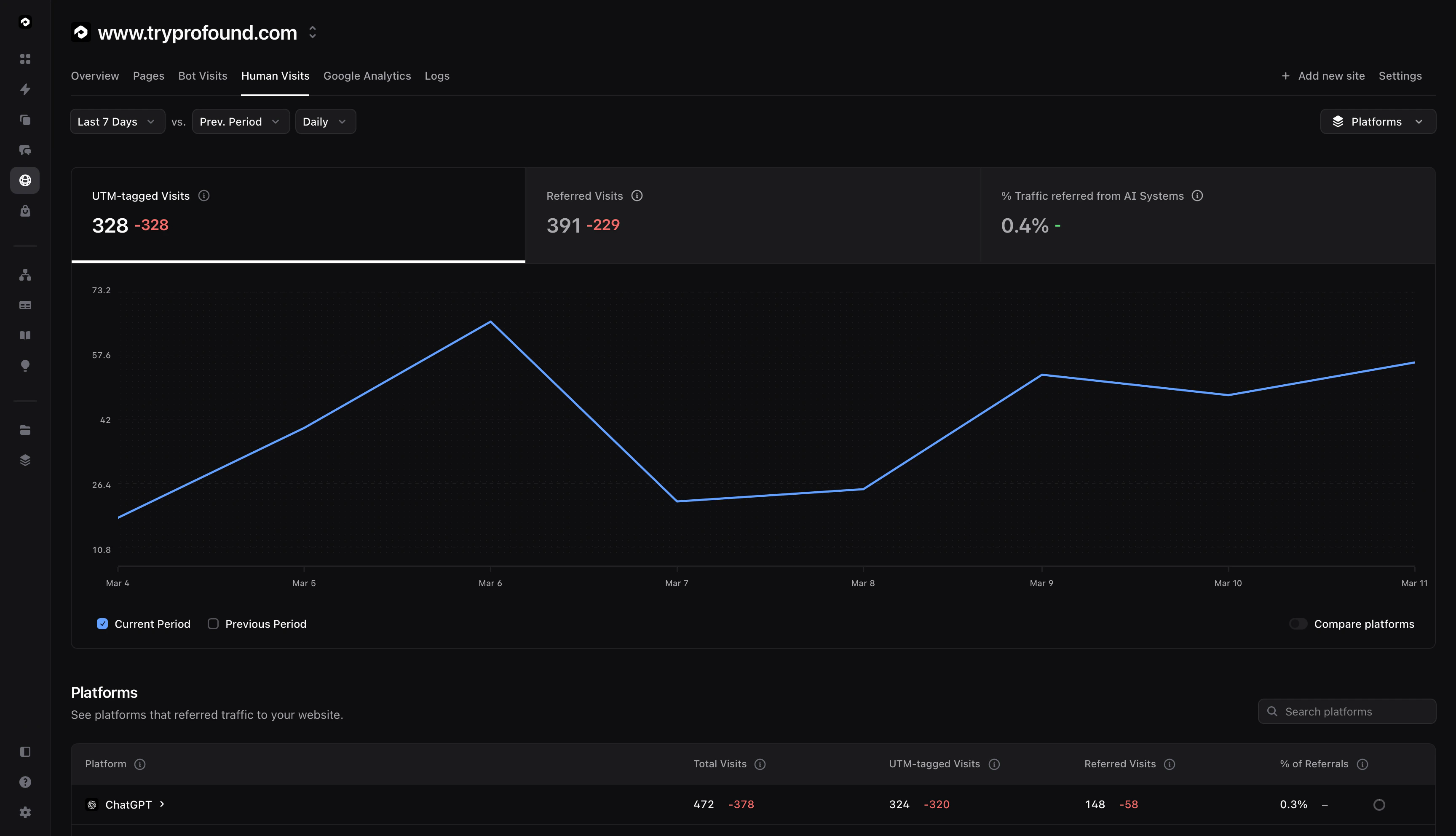
POST /v2/reports/referrals HTTP/1.1
Content-Type: application/json
X-API-Key: your_api_key

{
  "domain": "www.tryprofound.com",
  "start_date": "2025-12-16",
  "end_date": "2025-12-17",
  "dimensions": ["hour"],
  "filters": [
    { "field": "referral_type", "operator": "is", "value": "utm" }
  ],
  "metrics": ["visits"],
  "order_by": { "hour": "asc" }
}
リクエストボディ
| フィールド | 型 | 必須 | デフォルト | 説明 |
|---|---|---|---|---|
domain | string | はい | - | クエリ対象のドメイン |
start_date | string | はい | - | UTC での開始日。YYYY-MM-DD、YYYY-MM-DD HH:MM、YYYY-MM-DD HH:MM:SS、または完全な ISO タイムスタンプを受け付けます |
end_date | string | いいえ | 現在時刻 (UTC) | UTC での終了日。start_date と同じ形式です |
metrics | string[] | はい | - | 返す 1 つ以上の指標(下記参照) |
dimensions | string[] | いいえ | [] | 結果のグループ化に使用するフィールド(下記参照) |
filters | filter[] | いいえ | [] | 結果を絞り込むためのフィルター(下記参照) |
date_interval | string | いいえ | ”day” | date ディメンションのバケットサイズ: “hour” または “day” |
order_by | object | いいえ | 最初の指標の降順 | フィールド → “asc” または “desc” のマップ |
pagination | object | いいえ | limit: 10000, offset: 0 | ページネーションの設定 |
指標
| 指標 | 説明 |
|---|---|
visits | ユニークなページ訪問数 |
last_visit | 最新の訪問のタイムスタンプ |
ディメンション
| ディメンション | 説明 |
|---|---|
date | date_interval(日または時間)でバケット化。UTC ベース |
hour | 未加工の UTC 時間バケット — 追加の集計なしの date + date_interval: "hour" と同等 |
path | URL パス |
referral_source | リファラルソース(例: openai、perplexity、anthropic、other、internal、none) |
referral_type | トラフィックのカテゴリ: internal、referer、utm、none |
フィルター
| フィールド | 演算子 | 値 |
|---|---|---|
path | is, not_is, contains, not_contains, in, not_in | URL パスの文字列 |
referral_source | is, not_is, contains, not_contains, in, not_in | リファラルソースの文字列 |
referral_type | is, not_is, in, not_in | internal, referer, utm, none |
Raw データ
Agent Analytics の Raw エンドポイント
POST /v1/logs/raw および
POST /v1/logs/raw/bots は 2026-06-10 に廃止されました。集計済みのトラフィックデータには
V2 のボットおよびリファラルレポートの例 を、
実行ごとの Raw 行には V2 のプロンプト回答 を
使用してください。